PS4 Pro Games

DeepCool's Ark 90 cases comes with its own liquid cooling setup

 tháng 1 26, 2018     News     No comments   


An externally mounted water tube lets you keep tabs on the flow rate


DeepCool has released another case with an integrated liquid cooling solution. Called the Ark 90, this is arguably a better looking chassis than the Baronkase Liquid it launched last month, which itself also came with its own liquid cooler already mounted. In this case, it's a specially designed Captain series liquid cooling system with a 280mm radiator.

The cooler is basically an all-in-one solution, but with a transparent tube that runs down a crevice in the front of the case. This allows you to monitor the flow rate, or at least that's the stated purpose. Realistically, users will probably be more drawn the visual bling rather than the utility.
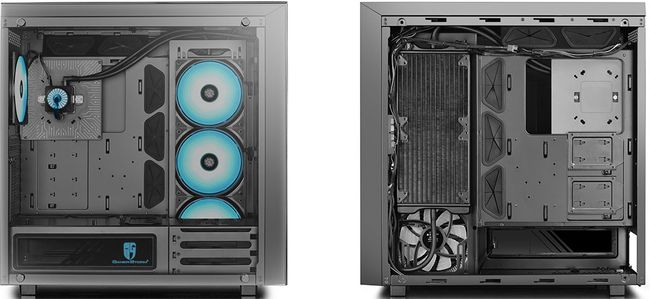


There is room to fit a second AIO cooler in the front, one with up to a 360mm radiator. Or you can populate the front with up to three 120mm fans.

DeepCool includes four RGB fans with the Ark 90—three 140mm fans attached to the liquid cooler, and another one more in the rear. In addition to the front fan mounts, you can install another three 120mm fans up top.

The case supports up to an E-ATX motherboard no bigger than 305mm x 276mm. For storage, it has three 3.5-inch drive bays and three 2.5-inch/3.5-inch bays.

Tempered glass panels cover the side, front, and top of the main section, with the side panel giving a view of your build. The case also comes with a riser cable to install your graphics card vertically, if you want. There is a little more room for long graphics cards if going that route—up to 400mm when mounting vertically, versus 310mm if sticking with a horizontal install.

The Ark 90 will be available next month for $300.

Read More
  • Share This:  
  •  Facebook
  •  Twitter
  •  Google+
  •  Stumble
  •  Digg

Acer Debuts the Acer Chromebook Spin 11 at Bett 2018

 tháng 1 24, 2018     News     No comments   


Acer Debuts Stylish Convertible Acer Chromebook Spin 11 at Bett 2018


  • 360° convertible design keeps touch display sturdy in four usage modes 

  • Two USB 3.1 Type-C ports for fast data transfer, charging, display output 

  • Wide field-of-view webcam is great for video and conferences; Optional world-facing camera captures photos and video in tablet mode 

  • Optional Wacom® EMR (Electro-Magnetic Resonance) Stylus enables natural drawing, note-taking and interactions

  • Up to 10 hours of battery life  for all-day productivity and enjoyment


LONDON (January 23, 2018) – Acer has announced its new Acer Chromebook Spin 11 (CP311-1H/CP311-1HN) at The Bett Show in London. Designed for families, students and individuals who want to embrace the ease and security of Chrome, the new convertible Acer Chromebook Spin 11 features a stylish design that can be used in four versatile usage modes. It also features all-day battery life and two USB 3.1 Type C ports for charging and connectivity to external displays.


In addition, the new Acer Chromebook Spin 11 (CP311-1H/CP311-1HN) fully supports Google Play and maximizes the functionality of the device’s 11.6-inch touchscreen display with stylus input. The optional stylus powered by Wacom® EMR (Electro-Magnetic Resonance) technology2 can be used with the Chromebook to provide an excellent digital writing experience that mimics actual pen and paper.


“We are continually innovating to improve every product in our extensive Chromebook line,” said James Lin, General Manager, Commercial & Detachable Notebooks, IT Products Business at Acer. “The new Acer Chromebook Spin 11 continues in the tradition of the Chromebook R 11, which won many awards for its design, performance and strong feature set, and now includes even more features that make life better for our customers, including the latest ports, all-day battery life and solid performance in a stylish, convertible design.”


Acer will be at the Bett show from January 24 to 27 at booth B100, where units of the new Acer Chromebook Spin 11 (CP311-1H/CP311-1HN) will be on display.


Stylish, Convertible Design


The new design of the Acer Chromebook Spin 11 features a sleek silver cross-hairline pattern on the top cover. This unique silky texture provides a premium look and feel that’s ideal for any environment.


The new Acer Chromebook Spin 11’s 360° convertible design ensures users can enjoy an optimized touch experience on the 11.6-inch HD IPS  display with 1366x768 resolution. After using the keyboard for input in traditional notebook mode, customers can open the touchscreen to a full 360° until it becomes a tablet. Plus, customers can stand it up in display mode to get closer to the screen, or use it in tent-mode for small spaces.

The Acer HD webcam located above the keyboard has a wide field of view – so it’s great for including groups in video conferences and Google Hangouts. The optional second webcam is placed on the cover, so customers can conveniently capture images and videos of their surroundings when in tablet mode.


Stay Connected to Peripherals, Wirelessly


The new Acer Chromebook Spin 11 includes two USB 3.1 Type-C Gen 1 ports, which can be used to charge the device as well as other products, transfer data quickly up to 5Gbps, and connect to an HD display to share visuals. The Acer Chromebook Spin 11 also includes two USB 3.0 ports and a MicroSD card reader to access and transfer content. Customers can stay connected to their network thanks to fast and reliable 2x2 MIMO 802.11ac Wi-Fi, and can connect to peripherals via Bluetooth 4.2.


Performance and All-Day Battery Life


Processor options on the Acer Chromebook Spin 11 include the Intel® Pentium® quad-core processor N4200, Intel® Celeron® quad-core processor N3450, or an Intel® Celeron® dual-core processor N3350. It also comes with 4GB or 8GB LPDDR4 memory and either 32GB or 64GB on–board eMMC storage.

The Chromebook Spin 11 is easy to transport in a book bag or backpack. It weighs only 1.25kg (2.75 pounds) and measures 296 (W) x 206 (D) x 19.95 (H) mm [11.65 (W) x 8.11 (D) x 0.78 (H) inches].


Optional Stylus For a Natural Writing Experience


The optional Wacom EMR stylus allows customers to sketch, take notes, capture ideas, as well as interact with programs and apps with precision. The Wacom EMR stylus provides a natural writing experience that resembles using pen and paper. Plus, it doesn’t require a battery and is resistant to accidental drops. The Wacom EMR stylus will come standard on Acer Chromebook Spin 11 CP311-1HN configurations.


Chrome OS Provides Speed, Simplicity and Security


Chromebooks are easy to use and share by multiple users. Customers simply log into their own Google account to access their Gmail, Google Docs, apps, extensions, bookmarks and other information. Chromebooks run on Google’s Chrome OS platform, which provides automatic updates and multiple levels of security to guard users against ever-changing online threats. Many Chromebook customers store their files on Google Drive  which protects files, documents, and photos safely in the cloud, and ensures that the most current version of the file or document is always available and safe, even if the Chromebook is lost or stolen.


Pricing and Availability


Several models in the Acer Chromebook Spin 11 line (CP311-1H/CP311-1HN) will be available in North America in March with prices starting at US$349 and in EMEA in April with prices starting at €379.

Exact specifications, prices, and availability will vary by region. To find out about availability, product specifications and prices in specific markets, please contact your nearest Acer office or retailer via www.acer.com.


###


About Acer

Founded in 1976, Acer is now one of the world’s top ICT companies and has a presence in over 160 countries. As Acer looks into the future, it is focused on enabling a world where hardware, software and services will fuse with one another to open up new possibilities for consumers and businesses alike. From service-oriented technologies to the Internet of Things to gaming and virtual reality, Acer’s 7,000+ employees are dedicated to the research, design, marketing, sale, and support of products and solutions that break barriers between people and technology. Please visit for more information.

Read More
  • Share This:  
  •  Facebook
  •  Twitter
  •  Google+
  •  Stumble
  •  Digg

Platinum #236: Miko Gakkou Monogatari: Kaede Episode (NA)

 tháng 1 23, 2018     Platinum Trophies, ps4 games     No comments   


Hey there!

Miko Gakkou Monogatari: Kaede Episode is probably one of the most boring adventure games I have played in my life.

What is the game all about?
In Miko Gakkou Monogatari: Kaede Episode you take control over shrine maiden student Kaede Yamabuki. At one day, you find some magical glasses, which are the reasons why Kaede falls in love with a stranger. This turns her whole world upside down.
Most of the time you’re just watching long cutscenes, which are in Japanese. You have the option to turn on Japanese or English subtitles. In between the cutscense, you must walk around a little bit to proceed with the story. Your actions while you’re in control of Kaede have a high influence on the story and will lead to different endings.
The story is pretty weird and focuses on Kaede, her friends, and youkai, some strange human-like beings which live in the woods.
The graphics are outdated but okay. You have to keep in mind that this is a school project and not an AAA game.

What about trophies?
Miko Gakkou Monogatari: Kaede Episode is an easy game and you will get all trophies within 5-6 hours if you follow the guideon ps3imports.org or watch the vide walkthrough below. Most of the trophies are story-related but there are 7 different endings and each will unlock a separate trophy. The hardest part in this game is not to fall asleep as the cutscenes are long and boring and you can’t skip cutscense in your first playthrough, which will take around 3 hours. Afterwards already seen cutscenes can be skipped.

Where can I get this game?
The game is available digital only in the NA and JP store. Each version has its own stack. If you’re looking for the Japanese version, you have to enter 巫女学校物語~楓編 in the Japanese store.
If you need PSN cards, you can buy them here. There you get digital codes, which will be send to you via e-mail within minutes.

As a trophy hunter, should I get this game?
Yes, but be prepared for long and boring cutscense. It’s best to play another game on your Vita to bypass time.

Hard Facts:
System(s)
PS4
Trophies
1P, 8G, 8S, 0B
Points
1140
Trophy Stacks
1
Difficulty
2/10
Time to Platinum
5-6 hours
Number of Playthroughs
7
Fun Factor
3/10

Yours,
AvengedEvil

Like what you read? Why not supporting me by donating 1$ at patreon.com/avengedevil? Supporting can be that simple and I’d highly appreciate it. Thanks!
Read More
  • Share This:  
  •  Facebook
  •  Twitter
  •  Google+
  •  Stumble
  •  Digg

Ayo Aktifkan Proteksi Ganda Account Playstation Network Kita (2-Step Verification)

 tháng 1 21, 2018     No comments   


Sebenarnya proteksi ganda menurut saya sangat diperlukan bagi para member PS4 yang bermain games secara serius dan berfikir akan digunakan dalam jangka waktu panjang. History pembelian game digital, library games, free games PS+, transaksi kartu kredit, Trophy, Save file dll, itu merupakan sebuah aset digital yang harus kita lindungi. Dengan semakin banyaknya game digital yang kita beli maka semakin penting akun PSN tersebut dan tentunya kita tidak ingin terjadi apa-apa dengan akun tersebut.

Akun PSN kita pada prinsipnya sama seperti sebuah "Bank" menurut saya pribadi, dimana semakin banyak kita beli game digital sama seperti kita menabung uang di dalam nya, maka semakin meningkat nilai dari akun tersebut. Di atas kenapa saya bilang untuk gamer yang yang berpikir jangka waktu panjang? karena akun PSN ini lah yang tetap akan kita gunakan saat nanti ada varian console terbaru lain dari Playstation, misalkan PS5 dan handheld yang mungkin akan di release di tahun-tahun depan.

Kita kadang berandai-andai, ah tidak mungkin server Sony terkena hack, Sony itu perusahaan teknologi yang sangat besar di Jepang yang isinya semua orang pintar. Namun fakta berkata lain, pada tahun 2011 Server PSN terkena hack yang bersifat sangat massive, dan pada kala itu server PSN sampai down selama 1 bulan. Tercatat pada saat itu ada sekitar 77 Juta akun PSN yang ter hack, yang mana angka tersebut membuat kasus ini menjadi salah satu pelanggaran keamanan data digital terbesar dalam sejarah manusia. Pada kala itu sistem keamanan Sony masih sangat lemah, hal ini mengakibatkan Sony melanda rugi sekitar 171 juta dolar. red. wikipedia

Saya akan jelaskan secara singkat terlebih dahulu apa itu 2-Step Verification, 2-Step Verification merupakan 2 pengaman ganda yang melibatkan kita sebagai pemilik akun untuk bisa mengakses akun kita sendiri. Keuntungan dari hal ini adalah, jika server Sony ke bobol lagi dan ada hacker yang mau mencoba login ke ID kita di mana hacker pasti sudah tau username dan password ID PSN kita, namun dengan mengaktifkan fitur keamanan ini hacker tersebut memerlukan lagi 6 digit kode verifikasi yang hanya dikirimkan via sms ke handphone kita, jadi prinsip kerja dari sistem keamanan ini adalah setiap kali kita mau login ke akun PSN kita, baik itu via komputer atau PS3/PS4/PS Vita maka server Sony akan mengirimkan sms yang berisi 6 digit kode unik ke no HP yang sudah kita registrasikan. Memang sih hal ini membuat membuat proses login sedikit lebih lama, namun kita tentunya berfikir lebih untuk aspek keamanan.


Untuk mengkatifkan fitur ini, teman teman tinggal mengunjungi web ini : https://www.playstation.com/en-us/account-security/2-step-verification/ 

lalu menekan tombol ACTIVE NOW,

lalu login seperti biasa, 

lalu tekan tombol Edit pada tulisan Inactive 2-Step Verification,

lalu tekan Activate,

Lalu Continue,  Pilih bendera Indonesia, lalu masukan nomer HP kita tanpa angka 0 di paling awal, karena sudah otomatis di isi +62 kode negara Indonesia,


lalu Continue, lalu Sony akan melakukan sms ke no kita tersebut,

masukan 6 digit angka ke halaman yang diberikan lalu klik Verify, lalu Oke,
maka otomatis kita akan sign-out dan muncul pemberitahuan via sms kalo 2-Step Verification sudah aktif.

Selanjutnya tinggal coba login seperti biasa, maka sebelum login akan ada sms seperti di atas lagi.

Setelah login kembali, Saya menyarankan untuk melakukan Print pada kolom Backup Code, backup kode ini digunakan jika 2-Step Verification sedang tidak aktif/ Ganguan, silahkan foto menggunakan handphone atau print kode tersebut.


Saya memiliki 3 akun PSN dengan region berbeda-beda, dan tentunya semua sudah saya aktifkan mode ini, dan faktanya, beberapa kali saya menerima SMS kode tanpa Saya request, yang tandanya ada orang lain yang mencoba untuk login akun Saya, namun terhenti dengan fitur keamanan ini. Saya tidak bisa membayangkan jika hacker tersebut berhasil login akun saya, mengganti email dan password, lalu menjual akun saya di black market, akun dengan banyak game di dalamnya tentunya akan laku untuk di jual.

Semoga informasinya bermanfaat untuk teman-teman, terimakasih.
Read More
  • Share This:  
  •  Facebook
  •  Twitter
  •  Google+
  •  Stumble
  •  Digg

Asus ROG STRIX RX VEGA 56 OC Edition Review

 tháng 1 21, 2018     Components, Computer Utility, Gaming PC, Graphic Cards, Reviews     No comments   


Asus ROG STRIX RX VEGA 56 OC Edition - Its all about that Raw Unadulterated Power


The wait was finally over last year when AMD rolled out the much awaited Vega cards for consumers in form of the RX VEGA 56 and RX VEGA 64 that not only are their first prominent step in the right direction but also after ages pose a real threat to their Nvidia counterparts in the main-stream division dethroning the GTX 1070 & placing the VEGA 56 in between the GTX 1070 and the GTX 1080 performance bracket! While the RX Vega 56 has been extremely successful and wooed in many enthusiasts and gamers including the ones who were beholden to a particular brand.

Thanks to Asus India I have with me today their latest Asus ROG STRIX RX Vega 56 OC Edition Graphics card for review which is as the name suggest the overclocked version of the Vega 56 and hosts a ton of other features including the ROG branding to say the least.


Asus RX Vega 56 OC Edition comes as one of the two cards that are based on the latest CGN 5.0 14nm FinFET architecture and have the Vega 10 GPU at their heart the same as that of the Vega 64, with 56 out of the total 64 compute units enables hence the name Vega 56 and has 3584 steam processor cores compared to the 4096 as that on the Vega 64. Apart from this the number of TMUs and ROPS are same on both models as 224 and 64 respectively. Our GPU today is clocked in at 1590Mhz boost which is 119Mhz over the reference model while the 20148 bus width 8GB HBM2 memory is at 800Mhz effective just like that on the reference edition so no changes there. All these tweaks give the Asus ROG STRIX RX Vega 56 OC a massive bandwidth of 410GB/s which is enough to handle any title in quad HD resolution.


What's in the Box!?


Asus brings the ROG STRIX RX Vega 56 OC Edition in a big-heavy cardboard box which
is mainly black in color with hints of red on the sides. The STRIX
and Vega logo along with the graphics card image occupy most of the real
estate on the packing while the Aura and VR ready logos are printed
clearly at the bottom and the very top right side. At the top left corner we can find the signature 'R' logo which was all started by the Vega Frontier Edition to complete the whole package.


On the back side the box boasts about the 3 years warranty that the card
comes with along with various technical and physical features that the RX Vega 56 comes loaded with such as the patented fan blade design,
two times more contact area for the cooler, Aura sync etc.


Inside the outer cover you will find a big black box with the STRIX logo
printed right in the center. Open this and you get a small envelop
nestled inside a foam cavity under which the RX Vega 56 OC rests in a
thick foam block wrapped in an anti static plastic bag.


On the accessories front the box included the Asus ROG STRIX RX Vega 56 OC Edition Graphics Card along with the driver DVD, user manual and two
ROG velcro cable ties. All in all the packaging is to the point and
protective enough to keep this beefy card safe and secure during
transit.


Take a Closer Look


The RX Vega 56 from Asus is an elegant looking card with an all black
matte finish and a triple fan design which looks old but is infact an
all new cooler design to keep this card cool even under extreme loads.


This unit weights in at 1.5Kg and measures in at 29.8x13.4x5.25 cm making it
one of the longest and thickest cars you can find on the market today.
Infact the card occupies two and a half expansion slots so keep this in
mind before buying this card as it can pose an issue for ITX users going
for a compact build.

Basically this is the same DirectCU cooler in size, design and specifications as that on the Asus ROG STRIX GTX 1080 Ti cards so as to provide the best cooling experience to this unit since we all know that there is a lot of hot and heavy technology under that hood to be cooled.


At the back the backplate is smooth with a X shaped retention bracket and is decorated with abstract designs
all over the surface and the Asus and STRIX logo near the top end. We
also find the ROG eye logo at one corner which is RGB LED lit and
imparts the signature ROG look to this RX Vega 56 from Asus.


The Asus ROG STRIX RX Vega 56 OC will offer five display
connectors; you'll spot two 1.2 certified Display Ports, two HDMI 2.0b
connectors and a DVI port. The dual HDMI arrangement is done with VR in
mind.

This sort of arrangement enables 4K displays at 120Hz, 5K displays at
60Hz, and 8K displays at 60Hz (using two cables) making the RX Vega 56
the best in class for UHD gaming, VR Gaming, recording and streaming purposes.


The ROG STRIX RX Vega 56 uses a triple fan cooling solution with new
IP5X dust resistant patented fan design for better-reliable cooling and
air flow experience. There are six heatpipes embedded inside the thick
aluminum heatsink, which is divided into two parts, with a nickle plated copper base that makes 40% more
contact with the GPU surface for more efficient cooling with lower noise
levels.  Since the Vega 56 is rated at 210 TDP this sort of arrangement is more than enough to keep this card cool even under intense load with enough headroom for overclocking which enabled Asus to release this OC Edition.

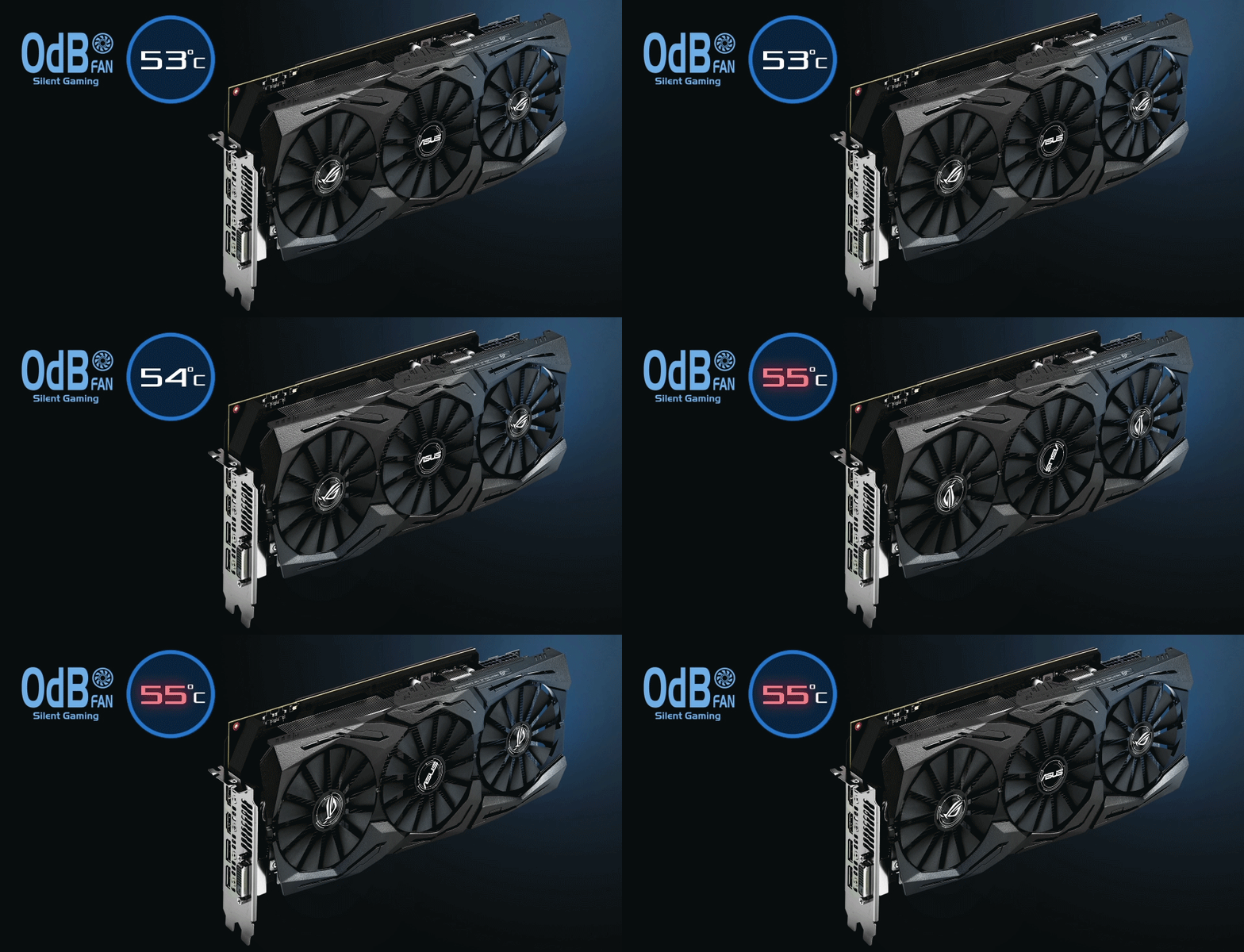
These fans don't spin at upto 55°C and after that they start
spinning in an ordered fashion with the right one spinning first
followed by the center fan and then the last left fan when the
temperature reached above 60°C to eliminate unnecessary noise. It is
also sounds and looks kind of cool to me so a few extra brownie points
for this kind of implementation.


At the bottom side the entire graphics card is clean with no heatpipe or
anything protruding outside of the huge plastic shroud but just the
PCIe connector at one end. While at the top we can see ssupport for
power connectors and SLI connectors, yes you can even SLI this monster
if you have the need and money well more of money than need I'd say!


The rear houses the RGB header and two extra fan headers that will spin attached
chassis fans at the graphics card fan RPM. These fan headers have been
carried forward from the precious generation design of Asus STRIX and
ROG cards and do a great job in not only providing some much needed fan
headers but also are a life saver when working in tight environments
such as ITX builds with less space and lesser fan headers on the
motherboard! However the use of the RGB header is still questionable since connecting a RGB strip to this header and routing it through the chassis is going to both difficult and impractical.


Due to the heavy and beefy nature of this card Asus has reinforced the entire cooling solution and PCB with a steel bracket cum heatsink that originated from the IO plate and run through the entire area of the PCB aswell as the cooler to impart that much needed tensile strength to avoid the graphics card from sagging under its own weight.


To power the Asus ROG STRIX RX Vega 56 OC Edition we have a two 8-pin
PCIe power connectors on top which make it capable of withdrawing 375W
on paper which is more than enough or sort of an overkill for a card rated at 210W TDP. This much power is enough to tweak the card for some further overclocking hopefully but it would definitely contribute to excessive heat generation if left at stock settings! Also Asus provides ts signature white LEDs on these connectors which light up and are static when the wires are properly connected and not those power phase activity lights as that on the reference design.


Benchmarks and Overclocking


Installing the Asus ROG STRIX RX Vega 56 OC Edition was easy and it powered up like a breeze once we booted up the system.

GPUZ reported the correct frequencies with 1590Mhz on the clock and 800Mhz on the memory.

For benchmarking the graphics card our new test bench was as follows -


CPU: Intel Core i7 5930K @4.5Ghz

Motherboard: Gigabyte X99 Gaming 5P

RAM: Kingston HyperX Predator 16GB DDR4 3000Mhz

Cooler: Cooler Master MasterLiquid Maker 240 

Graphics Card: Asus ROG STRIX RX VEGA 56 OC Edition


Storage: Corsair Neutron XTi 480GB

Power Supply: Cooler Master MasterWatt Lite 700

Case: Corsair Carbide SPEC Omega

OS: Windows 10 Pro 64-bit


Now overclocking the RX Vega 56 is not like what we usually do with other cards, we just can't dial up the voltages and add in some increments to the clocks till we start seeing screen tearing, dots or system crashes, that won't work here or well not work in an optimum manner. These RX Vega cards depend a lot upon thermals so much as so that you would find a different temperature reading for the card and another on just for the HBM memory on board which has a dedicated threshold of around 85°C. With that being said I firstly started by under volting the card and at -12% I managed a perfect balance of temperature threshold, fan noise and performance gains. At this stage the performance boost was significant at around 9°C drop in maximum temperatures.

Secondly I tried to overclock this already overclocked card at the same -12% power limit and was surprised to have obtained a stable 1670Mhz on the clock and 810Mhz on the memory while keeping the fans at auto as that's what most people would do and not like to have a jet plane inside their chassis! At this point I would like to mention that if I kept the power limit same and increased the clocks or increased the power limit and tried to overclock the card the frequencies that I managed were less or nearly the same respectively but with a lot of heat generation and I had to turn on the fans to 70% to keep the temperatures under check. Keep notice that if you follow this route the performance gains are not that great and you get a very high power drawn along with annoying fan noises all the time!

So be it any RX Vega card and in our case the Asus ROG STRIX RX Vega 56 OC edition would work great if under volted with significant performance boost even if you leave the clocks as they are, its just that you have to tune and find that sweet spot for your card that goes well with your requirements. Our benchmarks today would be at stock and at what we achieved on overclock that is at 1670Mhz clock and 810Mhz on memory.


AIDA64 Extreme edition GPGPU


The AIDA64 GPGPU test not only calculates the read, write and copy speed of the graphics card and processor but is also very useful in observing the SHA-1 Hash and AES-256 score. These are indications of how well the GPU can handle number crunching or real life image or video rendering. Higher score shows a better card.


3DMark Fire Strike & Time Spy


Fire Strike and Time Spy by 3D Mark is a test suit that plays a cinematic scene to determine the FPS, GPU temperature and CPU temperature scaling everything via a cumulative score. It is a great tool to benchmark your GPU since the render is mostly GPU & memory dependent.


Battlefield 1


The latest installation to the Battlefield franchise and mind it the grandest one of them all aswell, Battlefield 1 is a prequel to the infamous Battlefield 1942 placing the players right in the middle of World War 1. Based on the latest Frostbite Engine by EA-DICE, Battlefield 1 takes advantage of DirectX 12 with asynchronous compute to weave together richly detailed worlds. It is heavily taxing on current-generation hardware, and you're handsomely rewarded for investing more into your graphics setup. Settings are at Ultra preset with full HD resolution.


Ashes of the Singularity 


The latest installation to the Battlefield franchise and mind it the grandest one of them all aswell, Battlefield 1 is a prequel to the infamous Battlefield 1942 placing the players right in the middle of World War 1. Based on the latest Frostbite Engine by EA-DICE, Battlefield 1 takes advantage of DirectX 12 with asynchronous compute to weave together richly detailed worlds. It is heavily taxing on current-generation hardware, and you're handsomely rewarded for investing more into your graphics setup. Settings are at Ultra preset with full HD resolution.Developed by Oxide Games & running on the Nitrous Game Engine Ashes of the Singularity is a real-time strategy game set in the future where descendants of humans (called Post- Humans) and a powerful artificial intelligence (called the Substrate) fight a war for control of a resource known as Turinium.

We've used the in-built benchmarking tool and the result is shown in an average of all the graphical tests conducted over various locations and topographies of the game. DX12 API, Quality set to Extreme, 4xMSAA and everything else to high.


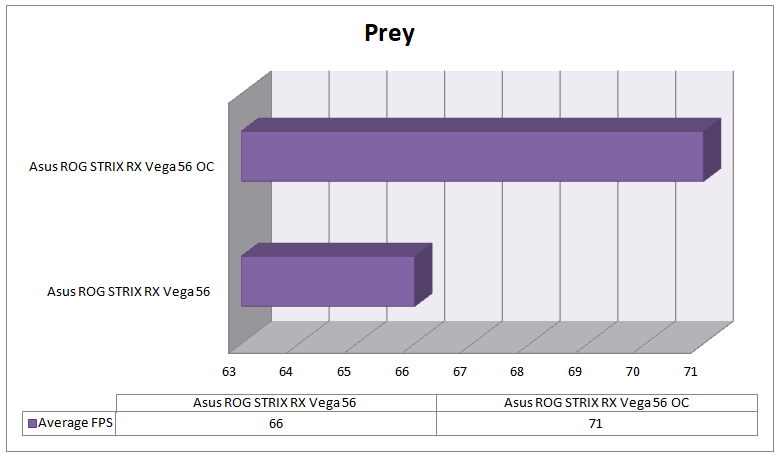
Prey


After releasing the excellent Dishonored 2 France-based Arkane Studios hits it out of the park again with Prey, a first-person shooter published by Bethesda Softworks as a reboot from 11 years ago.

Unveiled at E3 2016, Prey uses the CryEngine graphics engine and audio from Audiokinetic's Wave Works Interactive Sound Engine (Wwise). It is exclusively DX11 based so no DX12 or Vulkan testing is possible.


Rise of the Tomb Raider


The latest installation of Lara Croft in the spectacular Rise of the Tomb Raider 2016 with stunning graphics and rich location makes it a great game to benchmark with while enjoying in the due course! We used DX12 and settings were at Ultimate on full HD resolution.


Call of Duty: WWII


Call of Duty: WWII is a first-person shooter video game developed by Sledgehammer Games and published by Activision. Not only is it a a gamer's delight but a graphics card nightmare when all the settings are cranked up offering real life graphics and optimized gameplay.


GTA V


Grand Theft Auto V is an open world, action-adventure video game developed by Rockstar North and published by Rockstar Games. If you like open world adventure then this is something that you don't wanna miss with great graphics, catchy story line and unlimited potential for mods that keep coming in and out every now and then on the web. Our settings are as follows with very high quality, 16xAF, 2xMSAA and FXAA enabled.


Wolfenstein II: The New Colossus


Wolfenstein II: The New Colossus is an action-adventure first-person shooter video game developed by Machine Games and published by Bethesda Softworks. Not only doe it put you in the shoes of a futuristic armored suit, yey suits are back, but also gives you the ability to mow down everyone with all guns blazing! The game is well optimized but beats down upon the graphics card at all settings cranked up resulting in high power draw and heat generation.


The Evil Within 2


The Evil Within 2 is a third-person survival horror video game developed by Tango Gameworks and published by Bethesda Softworks for Microsoft Windows, PlayStation 4 and Xbox One. I personally love playing this game these days in dark room specifically, your preferences might be otherwise. Great gameplay and a well optimized graphical engine make sit a treat for the gamer aswell as for their graphics cad.


Forza Horizon 3


Forza Horizon 3 is an open world racing video game developed by Playground Games and published by Microsoft Studios for Xbox One and Microsoft Windows 10. The game features cross-platform play between the two platforms and is heavily demanding when it comes to PC resources. Our settings are at ultra preset with FPS cap removed.


Noise & Temperature 


The fans on the Asus ROG STRIX RX Vega 56 OC Edition don't spin
till the card hits 55°C or more. We recorded the maximum temperature in
Celsius that our card hit during extensive gaming & sound was
measured in decibels from a distance of 3 feet. This was performed for
both stock and overclocked speeds.


My Verdict  


AMD is back and its back for good with the RX Vega series namely as the RX Vega 56 over the 64 since the former delivers around 10% low performance with significantly lower power consumption, heat generation and can be tweaked to almost the same level with a much lower price point.

With that being said I come back to the Asus ROG STRIX RX Vega 56 OC Edition in hand today and boy this is a beast of a card and when I say that I don't refer to the sheer physical size but also to the raw performance & the feature bundle that it comes with. This card can easily mow down any GTX 1070 in the market and even some of the GTX 1070 Tis including those from third party manufacturers in some titles and synthetic benchmarks by its out of the box frequency itself and Adrenaline driver which would obviously get better with time considering the new HBM2 memory that these Vega10 GPUs rely upon. Asus chose the cooler well for its STRIX RX Vega 56 OC and came up with something that delivers impressive performance at low temperatures and minimal noise along with additional fan headers and RGB headers, in case you need them.

Talking about its overclocking potential I'd say that the RX Vega 56 largely depends upon how you handle the voltages on this card and with the Super Alloy Power II components as Asus likes to call them we see a significant boost in performance by simply lowering down the power limit as the power delivery components on board handle everything seamlessly to yield the best possible combination. Even when it comes to increasing clock frequencies the card is not a slouch and I was surprised that I managed to add some extra Mhz on this already overclocked unit all of which was handled by the DirectCU cooler lets say in a cool manner!

Some might argue that the power consumption on any RX Vega 56 is high compared to that on the GTX 1070 or even above models but I say that the Vega 56 is winner when you consider the fact that it offers seamless 1440p gaming performance at a lower price point and saves you another heafty spending through the much cheaper FreeSync monitors. Also with 10.5TFLOPs under the hood the RX Vega 56 beats the GTX 1070 and GTX 1080 that offer just 6.5TFLOPs and 8.9TFLOPs respectively which obviously won't matter in gaming but when you use softwares that actually use that power like Adobe Premier Pro etc then the RX Vega 56 would out shine its competition by a huge margin.


"The RX Vega 56 is the best AMD card till date and with the Asus ROG STRIX RX Vega 56 OC Edition the story gets only better. Solid build quality, unadulterated gaming performance and raw computing force makes this card the go to option for gaming, editing and rendering alike all of which is laced in the ROG goodness making it a worthy main-stream contender"


Pros - 


  • Good gaming performance

  • Solid build quality 

  • Runs cool and quiet under load

  • Higher bandwidth from HBM2 proves helpful at high resolution

  • Can be easily tweaked further for better performance  

  • Compatible Freesync monitors come at no extra cost


Cons - 


  • High power consumption  

  • Unstable pricing and availability


I give it a 8/10 earning our Gold Award!


Read More
  • Share This:  
  •  Facebook
  •  Twitter
  •  Google+
  •  Stumble
  •  Digg
Bài đăng mới hơn Bài đăng cũ hơn Trang chủ

Popular Posts

  • Platinum #345: Word Search by POWGI (EU Vita)
    Hey there! If you like word search, you must play this game. This 324 puzzles will keep you busy for a while. What is the game all about? Th...
  • Penjelasan Kode REGION Pada PlayStation 4
    Apa sih sebenarnya kode "Region" dalam PlayStation itu? Para user yang baru memiliki PS4 tentunya akan bingung tentang hal ini, p...
  • Platinum #301+302: Hex Tunnel Touch (EU & NA)
    Hey there! Once you get used to its awful controls, this game is very easy and can be beaten in half an hour or less. What is the game all a...
  • Review Indie Game: Sigi - A Fart for Melusina (PS4)
    Sigi - A Fart for Melusina merupakan sebuah game 2D plat former adventure buatan dari  pixel.lu , game ini bercerita kan tentang petualanga...
  • Corsair Carbide SPEC-OMEGA Review
    The Corsair SPEC Omega - Bling...Beauty...Boldness! Corsair took the market by storm when it released the SPEC Alpha in 2016 mid tower gamin...
  • PlayStation 4 (PS4) Angry Birds Star Wars Gaming Review Complete
                Release Date: Out Now       Genre: Family / Strategy       Publisher: Activision, Inc.       Developer: Exient, Rovio Rovio r...
  • HyperX Unleashes Predator DDR4 RGB With Infrared Sync Technology
    HyperX®, the gaming division of Kingston Technology, today announced the launch of Predator DDR4 RGB featuring industry-leading, patent-pend...
  • 100% #57: Minefild (EU)
    Hey there! Beating a level in large and hard mode can be a bitch. The rest is very easy. What is the game all about? Minefild is a simple M...
  • Platinum #261+262: MotorStorm RC (PS3 & Vita)
    Hey there! This game has been in my backlog long enough. It wasn’t the easiest Platinum but hey, the second one was for free! :-) What is th...
  • CORSAIR Launches New Carbide Series SPEC-04 Tempered Glass Mid-Tower Gaming Case
    Bold and Beautiful - CORSAIR Launches New Carbide Series SPEC-04 Tempered Glass Mid-Tower Gaming Case BENGALURU, India - October 27, 2017 CO...

Gagal Membeli Game Digital Di PSN Store Menggunakan Kartu Debit

Sebelumnya saya mau cerita intermezzo dulu , pada awalnya saya biasa transaksi membeli game digital mengunakan kartu debit Bank BTN , selama...

Tìm kiếm Blog này

Được tạo bởi Blogger.

Lưu trữ Blog

  • tháng 6 2019 (2)
  • tháng 5 2019 (13)
  • tháng 4 2019 (12)
  • tháng 3 2019 (3)
  • tháng 2 2019 (11)
  • tháng 1 2019 (15)
  • tháng 12 2018 (14)
  • tháng 11 2018 (5)
  • tháng 10 2018 (10)
  • tháng 9 2018 (26)
  • tháng 8 2018 (18)
  • tháng 7 2018 (31)
  • tháng 6 2018 (23)
  • tháng 5 2018 (18)
  • tháng 4 2018 (16)
  • tháng 3 2018 (27)
  • tháng 2 2018 (26)
  • tháng 1 2018 (39)
  • tháng 12 2017 (20)
  • tháng 11 2017 (54)
  • tháng 10 2017 (15)
  • tháng 9 2017 (18)
  • tháng 8 2017 (14)
  • tháng 7 2017 (9)
  • tháng 6 2017 (9)
  • tháng 5 2017 (7)
  • tháng 4 2017 (10)
  • tháng 3 2017 (23)
  • tháng 2 2017 (7)
  • tháng 1 2017 (5)
  • tháng 12 2016 (1)
  • tháng 11 2016 (8)
  • tháng 10 2016 (25)
  • tháng 8 2016 (5)
  • tháng 7 2016 (3)
  • tháng 6 2016 (4)
  • tháng 2 2016 (9)
  • tháng 1 2016 (3)
  • tháng 11 2015 (1)
  • tháng 10 2015 (2)
  • tháng 9 2015 (3)
  • tháng 8 2015 (3)
  • tháng 1 2015 (1)
  • tháng 8 2014 (6)
  • tháng 3 2014 (2)
  • tháng 2 2014 (2)
  • tháng 12 2013 (3)
  • tháng 11 2013 (1)
  • tháng 10 2013 (3)
  • tháng 9 2013 (5)
  • tháng 8 2013 (5)
  • tháng 6 2013 (13)
  • tháng 5 2013 (21)
  • tháng 4 2013 (6)
  • tháng 3 2013 (9)
  • tháng 2 2013 (14)

Nhãn

  • ;ego jurassic world
  • #
  • 1 HOUR PLATINUM TROPHIES
  • 100% Games
  • 2013
  • 2015
  • 2016
  • 2017
  • 2018
  • 2019
  • 3D
  • A
  • AAA Game Review
  • Action Game
  • Activision
  • assassin's creed IV ps4
  • Bajakan
  • Bank BTN
  • Batman 3 - Beyond Gotham
  • Batman 3 - Beyond Gotham ps4
  • Batman 3 - Beyond Gotham review
  • batman 3 ps4 review
  • Berita
  • Best Of PlayStation 4
  • best ps4 action game
  • Best PS4 Games For 2016
  • Best PS4 Games For 2017
  • best ps4 games for teens
  • Budget Gaming PC
  • Call of Duty :Black Ops III
  • Call of Duty :Black Ops III ps4
  • Call of Duty :Black Ops III ps4 bundle
  • call of duty black ops 3 release date
  • call of duty ghosts ps4
  • call of duty ps4
  • cheat
  • Components
  • Computer
  • Computer Utility
  • daftar poker
  • DAFTAR POKER ATAU DOMINO
  • Debut
  • destiny ps4
  • Digital
  • download
  • Download Iso
  • E
  • EA Sports
  • Electronic Arts
  • Emulator
  • Engine
  • F# 5.05
  • fallout 4 ps4
  • fallout 4 review
  • fallout 4 strategy
  • fallout 4 tips
  • fifa 16 career mode
  • fifa 16 demo
  • fifa 16 PS4
  • fifa 16 release date
  • fifa 16 review
  • fifa 16 trailer
  • fifa 17 reiview ps4
  • fifa 17 review
  • Fighting
  • final fantasy
  • final fantasy ps4
  • final fantasy XV
  • Fraud
  • Gagal
  • Game
  • GAME ONLINE
  • Games
  • gaming
  • Gaming PC
  • Gatget Review
  • Graphic Cards
  • Gratis
  • Hardware
  • HDD
  • http://cheatstationer.blogspot.com
  • Indie Games Review
  • Infinity Ward
  • INFO
  • Info Handheld 3DS
  • Info PS4
  • Info TV
  • iso
  • Jual
  • just dance 2016 deluxe
  • just dance 2016 ps4
  • just dance 2016 review
  • Kids
  • killzone ps4
  • knack ps4
  • knack ps4 review
  • Knowledge
  • lego jurassic park
  • lego jurassic world game
  • Limited Physical Releases
  • madden nfl 16
  • madden nfl 16 bundle ps4
  • madden nfl 16 deluxe edition
  • madden nfl 16 release date
  • madden nfl 17 ps4
  • madden nfl 17 review
  • Mandiri
  • minecraft PS4
  • minecraft ps4 trailer
  • minecraft review
  • mlb 15 limited edition
  • mlb 15 ps4
  • mlb 15 review
  • mlb15 the show review
  • MOBILE
  • Movie Review
  • My Story
  • Mystery
  • Naughty Dog
  • nba 2k16 ps4
  • nba 2k16 release date
  • nba 2k16 review
  • nba 2k17
  • New
  • new final fantasy
  • new ps 4 games
  • new ps4 games
  • new ps4 games for kids
  • News
  • nhl 16 release date
  • nhl 16 review
  • Nintendo Switch
  • online shoop
  • Only On PS4
  • Other
  • PC
  • PC Assembly
  • Platinum Trophies
  • playstation 4
  • playstation 4 games
  • Portable Console
  • power
  • processors
  • project cars list
  • Project CARS PS4 review
  • ps 4 sports games
  • PS Plus
  • PS Vita Games
  • PS+
  • ps2
  • PS3 Games
  • ps4
  • ps4 4 racing games
  • ps4 action game
  • PS4 action games
  • PS4 Bajakan
  • ps4 bundle destiny
  • ps4 call of duty
  • ps4 dance games for kids
  • ps4 fan club
  • PS4 Fifa 17
  • ps4 fighting game
  • PS4 fighting games
  • ps4 football games
  • ps4 games
  • ps4 games for everyone
  • ps4 games list
  • PS4 Lego games
  • ps4 lego star wars
  • PS4 Original
  • ps4 racing games
  • ps4 release date
  • ps4 shooting game
  • ps4 shooting games
  • ps4 specifications
  • ps4 sports games
  • PS5
  • PSN Store
  • ratchet and clank ps4
  • ratchet and clank review
  • ratchet and clank trailer
  • retro games
  • Review
  • Reviews
  • Rumor dan isu
  • SDD
  • Sledgehammer Games
  • Sony Interactive Entertainment
  • Spider Man
  • Sports
  • SSD
  • Star Wars Battlefront
  • Star Wars Battlefront ps4
  • star wars battlefront ps4 bundle
  • Star Wars Battlefront PS4 Trailer
  • Star Wars The Force Awakens review
  • Star Wars The Force Awakens trailer
  • Star Wars:The Force Awakens PS4
  • STORY
  • Strategy
  • Summing Up the Past
  • temperature
  • the crew ps4
  • Tips and Trick PS4
  • tips and tweaks
  • Trip and Trick PS4
  • Trophy Guides
  • Ubisoft
  • uncharted 4 review
  • Unchartered 4 : A Thief's End Collectors Edition
  • UPS
  • video games
  • watchdogs ps4
  • win a playstation 4
  • WTS

Báo cáo vi phạm

  • Trang chủ

Giới thiệu về tôi

Unknown
Xem hồ sơ hoàn chỉnh của tôi

Copyright © PS4 Pro Games | Powered by Blogger
Design by Hardeep Asrani | Blogger Theme by NewBloggerThemes.com | Distributed By Gooyaabi Templates