PS4 Pro Games

Hiển thị các bài đăng có nhãn gaming. Hiển thị tất cả bài đăng

MSI B360M Mortar Review

 tháng 4 19, 2018     Budget Gaming PC, Computer Utility, gaming, Gaming PC, Reviews     No comments   


MSI B360M Mortar - Small in Size, Big in Performance


Last Year in 2017 Intel dropped their latest consumer grade CPU lineup by the name of Coffee Lake which happened to be their first ever six core processors for the consumer lineup which was earlier restricted to only four cores. Being an answer to the AMD Ryzen CPUs which are processing juggernauts in their own rights the Coffee Lake CPUs suffered from one major flaw, they only support the newer chipset motherboards with no backward compatibility to the last generation LGA1151 motherboards restricting users to the then and now expensive Z370 PCH motherboards making Coffee Lake sensible for those who wish to buy the upper segment K series processors.

Now since the AMD Ryzen G series APUs are out Intel wisely released two new chipsets for their current Coffee Lake lineup namely as the B360 and H370 giving the budget CPUs of the lineup a new lease on life!


While the difference between the H370 and B360 chipset is nominal the with just a few USB ports more in the H370 than the B360 the main difference is in terms of the PCIe lanes which are 24 in Z370, 20 in H370 and only 12 in B360 making the B360 the ultimate choice for gamers on budget who desire a basic gaming PC with one graphics card only.


Alright so that was some insight into the past and present of Coffee Lake for you now moving ahead, today thanks to MSI India I have with me their latest offering in the B360 chipset lineup in form of the MSI B360M Mortar motherboard which happens to be our second B360 under the lens so far and our first ever mITX motherboard across every possible platform till date! Priced in at $99 or Rs 9,700 in India the B360M Mortar is pretty sleek and feature rich for the price featuring dual M.2 ports, extended heatsink for better cooling, Military Class IV components and Mystic LED support to go well with all that.


Packing and Accessories


MSI brings the B360M Mortar in a solid and slim grey cardboard box which looks like a armored briefcase to go with the theme of the product. The product name, MSI logo and an abstract Mortar is neatly printed on top and the Arsenal Gaming logo is at the center of the bottom end.


At the back we have all the features nicely printed in their graphical format along with a product image and labeled diagram of the IO panel and its ports. Overall the packing is to the point and informative enough with enough protection to the contents inside.


Inside the box under a tray we find all the accessories which are generous in number, we have the installation manual for the CPU, instruction manual for the motherboard, driver DVD, a Thank You note, stand offs and M.2 SSD screws, two non-braided SATA cables, IO shield and a MSI decal. For a motherboard of this stature these accessories are sufficient and enough to get you started immediately.


A Closer Look


The MSI B360M Mortar obviously being a mITX is smaller than what we are used to here but I must admit that MSI did a great job at how they've designed it through making it perfect for the name it comes with and the Arsenal branding to which it belongs.


The motherboard is primarily black with military themed grey laced all over the heatsinks, both the VRM and PCH ones. The heatsinks are massive especially the extended one on the IO panel side with a Mortar brnading on top while the PCH heatsink is atrociously small! The PCB has abstract markings and decorations to give it a feel of a military motif which is quite interesting. As a whole this motherboard is true to its branding atleast in terms of outer appearance which is great.


At the back of the motherboard we don't have anything special and even on the logos and branding end we just have the AMD CrossFire Logo which the motherboard ofcourse supports.


For the IO panel we have four USB 2.0 and one USB 3.1 ports, one USB
Type-C port, LAN port, gold plated 7.1 channel audio ports, one PS2 port, a
DVI port, display port and an HDMI port.

Resolutions up to 1920×1200 at 60Hz are supported on the single-link
DVI-D port, while HDMI offers 4K at a low refresh rate or lower
resolutions (such as 1080P) at 60Hz.


The CPU are is quite clean even though the motherboard is a mITX but due to the low profile of the heatsinks used beefy air coolers can be used here including those of Noctua which I don't expect anyone to use here as they'll hide half of the motherboard easily but still juts in case one wants to.

Socket over here is obviously the LGA1151 which supports all the Coffee
Lake CPUs till date including the locked and unlocked K series. The
motherboard doesn't support overclocking so sticking to a locked CPU is
what you should be doing here even though it supports K series CPUs
since you can't overclock them.


The MSI B360M Mortar comes with four DIMM slots that are non
reinforced and support RAM upto a maximum capacity of 64GB working at
2667Mhz which is the norm from Intel on these motherboards so if you
plug in a memory rated higher than that it would still be locked at
2667Mhz which is hurting but then its Intel's guidelines and no
motherboard manufacturer can do anything about it. Along side the 24-pin ATX power connector are the EZ Debug LED lights to help with troubleshooting and stuff.


Four SATA III ports are provided here out of which two are vertical and
two are horizontal which is great fro cable management. None of them
support RAID which is fine with me for this category and all these can
work when all four are populated which is a good thing as multiple SATA
devices is common these days.


Turn your gaze towards the PCIe slot areas now and we see that the motherboard has two full size PCIex16 slots, two smaller PCIex1 slots and two M.2 ports all of which are rated Gen 3.0. The top PCIe 3.0x16 slot is reinforced, wired directly to the CPU  and can support a full sized graphics card working at x16 while the bottom full sizes PCIe 3.0 slot is x4 only and shares its bandwidth with the second M.2 PCIex4 slot which is PCIe drive exclusive hence if populated the bottom PCIe slot would be disabled. The top M.2 port is PCIe 3.0x4 and can support SATA drives to but when using a SATA drive here you'll compromise one SATA port so be sure to check the manual first  to avoid any confusion or hassle.

Overall the PCIe lanes are well implemented here without any major drawbacks that I see one can face while using this motherbord if build a fast gaming system using one graphics card and a bunch of SATA and a NVMe storage. My only gripe is that the top M.2 slot doesn't come with a M.2 shield which could've been added in this price tag adding both functionality and aesthetics.


Since the B360M Mortar is quite feature rich but also a near $100
motherboard a few cost cutting features are bound to brought into
effect, the most prominent being the use of the Realtek ALC892 audio
codec over the more conventional ALC1220 which is not that good when
powering larger speakers over the latter but works flawlessly if not
better when paired with gaming headsets.


The power delivery system here is a 4+2 phase both for the CPU vCore and the iGPU rails which are channeled through a Richtek RT3607C chip that allocated four channels to the CPU power delivery while two channels for the iGPU inside. An arrangement such as this when cooled by ceramic heatsinks is enough for a motherboard which doesn't support overclocking and will ensure stable performance using CPUs as such.


Among all the chips present on the motherboard a few are noticeable such as the Intel i219v for the LAN functionalities, the use of two ASMedia ASM1480 to switch the PCIe 3.0x4 lanes between the bottom full sized PCIe slot and the second M.2 slot.


BIOS and Bundled Software


BIOS Overview
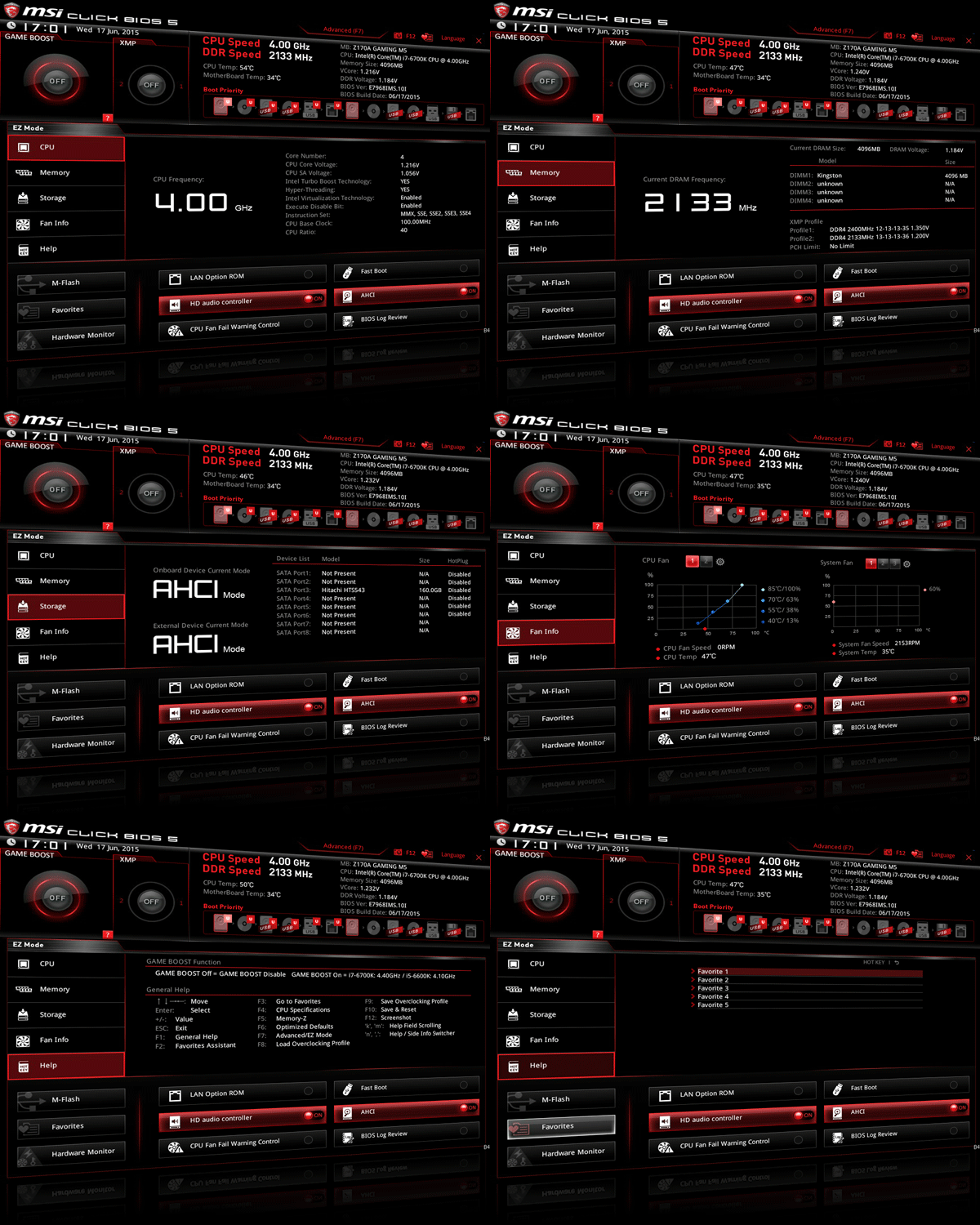


UEFI BIOS is getting more and more common with each manufacturer opting for it due to its simple and flexible interface along with the option to navigate via a mouse rather than a keyboard exclusive BIOS. MSI is no different and has offered not one but two versions of BIOS, EZ and Advanced versions, with the MSI B360M Mortar so as to suit every customer's needs.

On boot up by default you'll be greeted with a more comprehensive and detailed EZ BIOS screen. This is a crammed up screen that has the details about all the components installed on the board along with options laid out neatly under clear tabs on the left side. If you want to change fan speeds, maybe boot devices, or use its automated overclocking function, you can do so quickly and easily.


This is a much preferred version for the beginners and though it comes
with a Game Boost Knob on the top left its useless since the Gaming Plus
doesn't support this feature. The "Memory Try It" feature is present but won't be helpful since its a B360 PCH motherboard the restriction of 2667Mhz is applicable in every way possible.

On pressing the F7 key you'll be teleported into the Advanced BIOS
version or the traditional MSI UEFI BIOS version. This is a version that
all the overclockers will love since the settings are broadly laid out
with tab heading like Over Clocking Settings itself but sadly these won't work here as its a no overclocking motherboard. A plethora of
features are there out of which I'm showing you a selective few.

However there is a bit of an issue with the MSI current BIOS as of now which is related to RAM frequencies about which we'll talk in the next
section.


Bundled Software 


This is the era when manufacturers provide customers with not just a
motherboard and utility softwares that act more like blotwares if
nothing else. Gigabyte App center is already what I've reviewed a lot of
time & it has never failed to impress but MSI is no less rather  a
bit more refined in their approach.

The heart of the software set is the MSI command set which gives you
general features and information regarding the CPU, GPU, Fan Speed, IGP
and the Game Boost knob...again!


Also one beautiful graphical window is there that provides you with
temperature readings of each component & even tell you where they
are located on the board.

The gaming app section is something that you'll  be familiar to if you
are a MSI graphic card owner. It give you all the information and
tweaking options related to your GPU and you can select which vital stat
you want to see on your screen. Also you can adjust mouse sensitivity
and assign hot keys to your gaming mouse from here making it a one stop
solution for gaming.


Another added feature this time is the support of wireless control over
the MSI Command Center which can be achieved via an App for your cell
phone that allows full control over the features of the motherboard
including adjusting voltages and frequencies aswell!

Some extra software include the SteelSeries Engine 3 for Steelseries
gaming accessories, MSI version of CPUZ, XSplit Gamecaster with one year
free subscription etc


Benchmarks and Overclocking  


Putting all the components together and booting up into Windows was a
breeze with the MSI B360M Mortar. Everything worked properly out
of
the box which is a very good sign and since MSI had released no new BIOS by the date of review I'll be using the BIOS the motherboard came out of the box. Even though the motherboard features almost no RGB or non-RGB LED with the audio isolation strip being illuminated it looks quite impressive by its sheer looks.

For the benchmarks we used the following test setup configuration --


CPU: Intel Core i5 8600K

Motherboard: MSI B360M Mortar

RAM: Kingston HyperX Predator 16GB DDR4 3000Mhz

Cooler: Cooler Master MasterLiquid Pro 280

Graphics Card: Gigabyte GTX 1050 G1 Gaming OC

Storage: Corsair Neutron GTX 480 480GB

Secondary Storage: ADATA XPG SX8000 256GB M.2 SSD

Power Supply: Cooler Master MasterWatt Lite 700

OS: Windows 10 Pro 64-bit

GPU Driver: ForceWare 375.70

BIOS: 1.0F


Now even though Intel has put a strap of 2667Mhz on the B360 chipset which means no matter how high frequency kit you pair with this platform it would come down to work at 2667Mhz only even with higher frequency XMP profile enabled. Sadly in my case the HyperX Predator kit which comes with two XMP profiles of 2666Mhz and 3000Mhz couldn't work on either and I had to settle for the default 2133Mhz here. This is an issue with the initial BIOS and even MSI had the same issue with its Z370 platform when it first came out with stock factory BIOS but that was fixed with the second BIOS that rolled out so I expect the same for the B360 platform aswell in the days to come but for now we'll settle for the 2133Mhz only along with the Intel i5 8600K working at stock frequency and boost enabled.


AIDA64 Cache & Memory Benchmark


AIDA64 Extreme Edition is a great tool to bench your CPU and RAM in
terms of their read-write-copy abilities. Our i5 8600K showed an
impressive score along with the HyperX Predator kit.

Bear in mind that the MSI B360M Mortar couldn't go past the 2133Mhz mark
on the available BIOS at the time of testing so the results are
accordingly.


AIDA64 GPGPU


The reason for including
this benchmark was to simply observe the AES
and Hash Test which is a determent of how easily your CPU or GPU can
crunch complex calculations and higher score is always regarded better.
We've compared the CPU score over here since I had homogeneous data of
the CPU for all four motherboards.


Cinebench R15


Cinebench uses Maxon's Cinema 4D engine to render a photo-realistic
scene of some shiny balls and weird things (we miss the motorbike). The
scene is highly complex, with reflections, ambient occlusion and
procedural shaders so it gives a CPU a tough workout.

As Cinema 4D is a real-world application - used on films such as
Spider-Man and Star Wars - Cinebench can be viewed as a real-world
benchmark.


wPrime v2.10


wPrime is a leading multithreaded benchmark for x86 processors that
tests your processor performance by calculating square roots with a
recursive call of Newton’s method for estimating functions.


SuperPi Mod 1.5


SuperPi is a simple program that utilizes the processing power and
memory speed of the system to calculate the value of Pi upto 1 Million
or 32 Million decimal point depending upon what you choose. The time is
calculated in minutes and seconds, we'll take them both in seconds, so
lower the score faster is your computer.


3DMark Fire Strike & Time Spy


Fire Strike by 3D Mark is a test suit that plays a cinematic scene to
determine the FPS, GPU temperature and CPU temperature scaling
everything via a cumulative score. It is a great tool to benchmark your
GPU since the render is GPU dependent.


PCMark 10


The latest offering from PCMark is the PCMark 10 and unlike its
predecessor the new suite evaluates the entire system performance
through just one long test, though you can always opt for the quicker
and smaller ones, but the test for modern offices and home is the
perfect replica of what one professional would do in their daily lives.

The performance is evaluated through basic tests like video conferencing
and web browsing to complex tasks such as graphic and video editing or
even rendering through POV Ray!


Rise of the Tomb Raider


The latest installation of Lara Croft in the spectacular Rise of the
Tomb Raider 2016 with stunning graphics and rich location makes it a
great game to benchmark with while enjoying in the due course! We used
DX12 and settings were at Very High on full HD resolution.


Battlefield 1


The latest installation to the Battlefield franchise and mind it the
grandest one of them all aswell, Battlefield 1 is a prequel to the
infamous Battlefield 1942 placing the players right in the middle of
World War 1. Based on the latest Frostbite Engine by EA-DICE,
Battlefield 1 takes advantage of DirectX 12 with asynchronous compute to
weave together richly detailed worlds. It is heavily taxing on
current-generation hardware, and you're handsomely rewarded for
investing more into your graphics setup. Settings are at High preset
with full HD resolution.


CrystalDiskMark 5.0.2


CrystalDiskMark
is a disk benchmark software that analyses different
types of hard drive. Giving sequential benchmark write and read
statistics in MB/s. A simple program that is very useful here, the above
benchmark is for the ADATA SX8000 M.2 SSD and we see the desired speeds
using the MSI B360M Mortar.


My Verdict 


The general perception about mITX motherboards has always been a smaller motherboard with cut down features but all that has lately changed and the MSI B360M Mortar is one leading the pack when it comes to the B360 division here. The motherboard is well perceived and designed with unique aesthetics that catches ones eye even when the motherboard is not connected or powered on and the best part is that some of those aesthetics are actually functional such as the extended heatsink on the IO panel side effectively keeping the power delivery system cool even under full load.

The lack of onboard RGB lights on this board is a double edged sword which might please a few while disappoint another few but that's a subjective topic and better left untouched. Implementation of the PCIe lanes on the motherboard is well thought of with two M.2 ports, one PCIe slot and four(three) SATA ports all working at the same time which is more than enough for any gaming PC or HTPC build that one can expect building in this price range. About performance there are no complaints whatsoever as the motherboard performs as expected in every synthetic and real life benchmark placing the B360M Mortar right next to more competition.

BIOS is an issue right now but I'm sure by the time you'll buy this motherboard new BIOS will roll out which will address the memory compatibility issue for sure. One gripe that I have here is that none of the M.2 ports are shielded which should've been an addition here as its inexpensive but adds both looks and functionality.


"The MSI B360M Mortar is physically small and technically strong, offering a great balance of attractive looks, solid performance and to the point pricing making it a force to reckon with. A must have on every gamer's shopping list for building a fast and powerful gaming PC on a budget."

Pros -


  • Distinct Looks

  • Solid build quality

  • Good Performance 

  • Aptly priced


Cons - 


  • No M.2 shield


I give it a 8/10 earning our Gold Award!


Read More
  • Share This:  
  •  Facebook
  •  Twitter
  •  Google+
  •  Stumble
  •  Digg

ADATA XPG EMIX H30 and SOLOX F30 Review

 tháng 1 31, 2018     Budget Gaming PC, Components, Computer Utility, gaming, Gaming PC, Reviews     No comments   


ADATA XPG EMIX H30 and SOLOX F30 - Sassy Looks with Splendid Bass


ADATA turned quite a lot of heads last year when it launched their XPG EMIX lineup of audio gears with an in-ear gaming earphone called the XPG EMIX I30 which we reviewed a few days back and the EMIX H30 over the head gaming headset and SOLOX F30 Amplifier. The venture is an interesting move not only for ADATA alone since its their first venture into the field of audio devices but also as a whole since this puts ADATA in a league of manufacturers that deal both in memory devices as well as peripherals!

Today thanks to ADATA India I have with me the ADATA XPG EMIX H30 Gaming Headset and SOLOX F30 Amplifier that happen to be the flagship product of this new EMIX lineup.


Coming with a hefty price tag of $200 the EMIX H30 headset utilizes 53mm neodymium drivers to deliver a thump pumping audio quality at a maximum 20Khz all working perfectly with almost any device you can name of including PC, cell phones, tablets and even gaming consoles of the latest generation.

With an impedance of 32 Ohms and a maximum output power of 150mW we're looking at around a 50mW output higher than competing headsets, which looks quite good on paper and seems impressive for a product that is first of the lot.

As an addition we get features like red lights on the cups, USB connectivity and 7.1 virtual sound experience that we would obviously expect from a headset of this category. For the SOLOX F30 we don't have much to say here but will be discussed later on in the review.


What's in the Box!?


The XPG EMIX H30 gaming headset comes in a humongous box the likes of which I've never seen for a headset so far in all these years of my life, its simply too big even premium motherboards from Asus or Gigabyte don't comes in boxes this big! The box is primarily black and red in color which are the signature color combo for the XPG lineup with the headset, amplifier and stand arrangement in the center and an abstract X shape in the background and the XPG logo at the top left corner.

Product's name is clearly printed in a glossy texture at the bottom end along with a few feature highlights.


Turn to the backside and we get a well detailed and marked diagram of the product with almost every detail about every inch of the product including the headset, mic, amplifier and even the cables. A few more logos and Skype compatibility are highlighted at the bottom side completing the whole package with details and images making it a good & informative packaging from the outside. I would've loved a showcase window on top with a flipper as this product deserves that kind of packaging and showcase so hopefully ADATA would listen to his small suggestion and try to incorporate it in the future batches of the same.


Open the big box and we find everything well laid out inside a foam cavity which is resting inside thick and sturdy black cardboard box which adds that extra cushion and strength to the packaging.

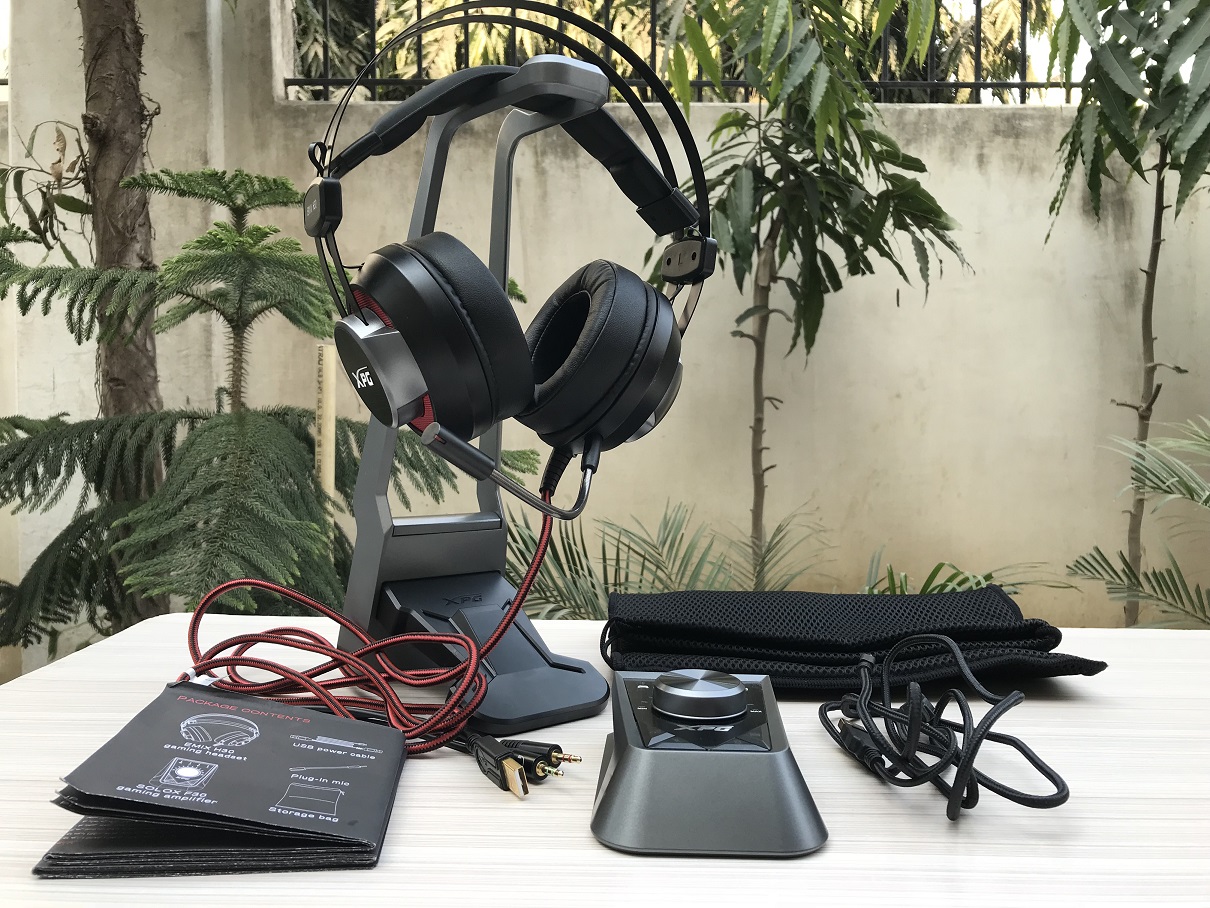
Once you've got everything out you'll get the EMIX H30 gaming headset, the SOLOX F30 amplifier, a headset stand, the detachable mic, a power cum connection cord for the amplifier, a user manual and a carry pouch to carry the headset and amplifier when required for on the go gaming style or just a casual trip to a friend.


A Closer Look 


The XPG EMIX H30 Headset


The XPG EMIX H30 gaming headset is largely made out of premium quality plastic which on the bright side gives it a light weight construction without compromising much upon tensile strength. The entire color theme here is that of black and red which by now has become the universal theme for gaming products and is also that of the XPG lineup so ADATA is maintaining homogeneity here.


Earcups on the EMIX H30 are made out of plastic that has a brushed aluminum like finish accentuated with a chunky XPG branding on the side and a red mesh that lights up bright red when connected to a PC or any other device via the red LEDs underneath. These are connected via the aluminum frame and cannot rotate on the pivot which is something that I'd likes to have here for easy mobility aswell as wearing around the neck comfort.

The foam over here is a memory foam and quite thick and well textured to mimic actual leather while it isn't which gives it nice aesthetics. About there comfort we'll see when I'll be testing them but from the looks they look promising enough.


Headband is made out of solid but flexible aluminum for strength and looks while the leather strap underneath is contoured, has an XPG logo on top and is stuffed with a layer of foam. This band itself is responsible for the adjustment aswell as fitting of the headset on your head since the aluminum headband is non-adjustable at the cups but only apply the clamping force on the ears. This is a good move if you don't like a heavy headband sitting on top of your head but can result in slippage as the leather band tends to slip over hair and skin if you jerk your head.

The head strap is attached to the metal frame via strong and flexible strings that looks sturdy enough but what irks me here is that flat ribbon wire that is sticking out at the edges responsible for the connection between both the cups. This wire is strong but can break or tangle in ear rings, hair clips, beads etc if the user is not cautious enough.


Wire on the EMIX H30 is quite thick, braided with red and black color scheme and is 2.4m long which is more than enough for anyone. It ends up into a USB port and a 3.5mm audio jack for the audio and another one for the mic which are all gold plated for enhanced signal transfer. I would've liked a detachable cable here but that's something subjective to ones own preferences.


The XPG SOLOX F30 Amplifier 


The XPG SOLOX F30 comes bundled with the XPG EMIX H30 and can be bought separately aswell if one wants to use it with any other brand's headset/earphone. The SOLOX F30 is basically an amplifier for the EMIX H30 that not only comes with a bunch of presets and volume dial but it also enables the headset to have that 7.1 channel virtual surround sound experience which can be further customized if require using the XPG Audio Center.

It is made out of premium quality plastic just as the headset and for a change boasts a black and grey color them, than god! The volume dial in the center is with a gun metal finish while the four buttons at the bottom are textured. This amplifier has magnetic strips at the bottom so that it can stick and sit snugly on to the provided stand to avoid falling off when moving.


At the left hand side the SOLOX F30 has a USB port and two 3.5mm ports which are neatly labeled as mic and headset. This is where you can connect the EMIX H30 headset or any other headset/earphone that you are using with it. The USB port is only required here to power the red LEDs on the headset so its not an issue if your audio device only has a 3.5mm jack(s) as the audio optimization works on the jacks only.

Turn to the right and we find two USB ports along with a micro USB port and another 3.5mm port. The micro USB port is to attach the power cum connection cable for the amplifier that's provided with the bundle while the two USB type-A ports can be used to connect any USB based device such as a keyboard/mouse, flash drive, portable HDD and even to charge your phones. The 3.5mm port is to connect any other speaker set or even headset/earphone. Since this 3.5mm port works in sync with that on the other side so you'll listen to the same sound on both the devices and would be optimized in harmony aswell.


The volume knob is a 360° free rotating knob and has a ticking feeling to it when turned and volume is indicated via the LED lit marks on top, by default it will always be set to 50% volume. Apart from that he four buttons at the bottom are namely as the equalizer/mode changing button to switch between the Gaming, Movie, Voice and Music modes, 7.1 virtual surround sound on-off button, mic on-off button and the a very interesting relay button which when red indicates that the main jacks on the left are active, press it again and you'll have purple which turns on the jacks on both side making both the audio devices connected work in sync and a third time press would make it blue muting the main jacks on the left and keeping only the one on the right active.


The wire provided with the SOLOX F30 amplifier is around 1.2m long and is braided ending into two USB Type-A connectors and one mic USB connector which are all gold plated as well for enhanced signal transfer. You only need to connect one of the USB Type-A connectors, which is the bigger one of the two having the USB logo, to make the amplifier and the other USB ports on it work but the other one can be connected if you are using any pair of devices that demand too much power like a portable HDD and cell phone charger in combination.


The Mic


ADATA has provided a full flexible and detachable microphone with the XPG EMIX H30 gaming headset which has -42dB sensitivity and a frequency response of upto 10Khz for crystal clear reception. The mic is unidirectional and can be used with the headset or alone along with the SOLOX F30 amplifier maybe for voice overs or skype calls in a group which is quite handy at times and also makes the mic along with the whole package quite comprehensive and user friendly. It also has a red LED at the tip which lights up when the mic is in use and active.


XPG Audio Center


Although the XPG EMIX H30 and SOLOX F30 combo is quite competent in its own right and are a plug and play device both with Windows and Mac ADATA still went a step ahead and provided the XPG Audio Center for fine tuning and added control over the bundle! You get all the details about the sound on top with the master volume on the right and boldly written Speakers and mic on the side on which we can hover the mouse and get the the related options to select from.


The utility can be downloaded from the official website and has bunch of useful functions and added presets to make the most out of the SOLOX F30 amplifier. Not only does it have equalizer presets for music such as Jazz, Pop, Rock etc but  provides custom tuning ability. We can even change the sample rate for the speakers aswell as for the mic. Though all the other features work just fine except for the Xear Audio Brilliant which on too high a level, however, the setting can become a double-edged sword, because you hear more details and the sound is not quite as deep, but quiet noise sneaking in.

My favorite out of the lot is the Xear Surround Max as it adds that depth to the rich bass that the headset already provides making it even better especially for bass rich music, movies and games so any bass head would love to keep this setting on always. The only down side to this utility is that it may look too bland to a few people out there so I expect ADATA to revamp this utility and give it a more rich and deep cosmetic UI.


Time to hit the Cords - Performance testing!


Are they Comfortable!?


The cushions on the earcups are soft and feel really smooth against the ear without creating any sort of irritation at all. Even though they are leather and non breathable like a fabric they don't cause any sweat or irritation in and around the ear since they apply a perfect clamping force on the ears due to its lightweight construction, infact these are so light that at one point I forgot that I'm even wearing something so big over my head and ears. I've used a lot of headsets and the ADATA XPG EMIX H30 sits on the positive side of the comfort spectrum with being quite light weighted and cozy on the ears making it a comfortable pair of cups.

Also the leather strap headband is perfect for my head-size and so would be for most of you out there. Its quite comfortable and keeps the headset in place even if I jerk my head suddenly all without hurting my head with too much pressure which is what one looks for in any headset & not just a gaming headset!


How do they Sound!?


The sound signature on the XPG EMIX H30 is variable courtesy to the SOLOX F30 amplifier that it comes bundled with and can be altered to ones personal choice and the work in hand at that point of time. Still the Game mode is something that would work out for almost everything that you do from gaming, listening to music or just talking over skype.

This means that in Crysis 3 we had no issue whatsoever in listening to or understanding what Prophet was saying and noises were greatly distinguished in the heat of battle, even of the crickets in the NY jungle! Battlefield 1 came out fully immersive especially when it came to sitting inside the battle tanks or listening to aerial bombing happening across the field. In Shadow of War we could really feel the voices coming from different directions due to the 7.1 virtual surround sound effect which works exactly as it should for a virtual sound solution and interestingly even though these headphones generate significant bass they didn't distort the sounds of footsteps from behind due to good balance of treble and mids intact and I was able to pin point the enemy location making it a great choice for eSport players including CS:GO.

The passive noise isolation isn't too great even though these are leather cups and people around you can listen to what you are listening to especially if you dial up the volume over the 50% mark making it a bit annoying at times. On the other hand noise cancellation is pitch perfect and you I didn't hear anything around me when these are put on even at low volumes which is a great thing for immersive experience.

Coming over to music I don't recommend that you use the Music mode as the Game mode would do the trick but yes you can turn of the Xear Surround Max option in case you want to lighten the bass a little bit. With a good balance of mids-lows and amplification from the bundled amplifier they cover all ends of the sound spectrum well making listening to music or watching movies a great enjoyment. Yes at some points you might feel that the headset is vibrating under its own bass so always keep the volume between the 50%-70% mark as at 100% these cups can get really loud and punchy which is something that most of us might not want or appreciate but a few metal heads might!

In short gunfire is almost percussive, explosions suitably disorientating and dialogue clearly discernible from the background music. In short, you'll be stunned at how good the XPG EMIX H30 sounds.

The bilateral mic on the EMIX H30 is really good for almost everything. At 100% sensitivity the mic pics up your voice perfectly and reproduces it with a certain depth and detailing which is what you need for voice overs or audio calls if not game chats. The only downside is that a bit of nasal comes into play at this high sensitivity which can be get rid off if sensitivity set to 70%-80%. Obviously the nasal factor won't be audible to other if you are just speaking to them but it'll be noticeable if using it for a voice over or streaming purposes.


My Verdict


The realm of gaming audio accessories is dominated by some veteran players like Razer, HyperX and SteelSeries and whatever was left is being filled up by new players like Corsair and Asus so with so much going on around making a place for a brand like ADATA is a tough task in hand which they seem to have tackled pretty well with the EMIX H30 and SOLOX F30 combo! With a well tuned 53mm driver and balanced output that juggles between bass and treble quite effectively we are looking at a headset that does exactly what its meant to do right out of the gates. The plastic build quality is definitely not cheap and shaves off that extra weight from the headset making it a tad bit more comfortable on the head with a reasonable clamping force. The bundled amplifier is not only a welcome addition which not only imparts a wholeness to this package but also does a brilliant job in amplifying the sounds through the various presets and equalizers all with the added benefit of two USB ports for devices and speaker/headphone relay to make that movie watching experience or gaming session with a friends and family a whole lot of fun.


Obviously any audio device with a bundles amplifier would cost more and so does the ADATA XPG EMIX H30 at around $200 but by cleverly using red lights only instead of RGB and premium plastic in place of metal for not only the headset but also for the amplifier they've managed to place this product somewhere in between the premium and enthusiast section. Though the price is not the major issue here a few things can be troublesome for a few people such as the headset cups not rotating at all and sitting stationary which compromises its mobility especially considering the fact that the EMIX H30 is aimed at that coming in with a carry pouch! Also the whole amplifier arrangement with no detachable cable from the headphone can leave you with vines of wires running both on and off the table if you are using it in a tight space which is a subjective draw back obviously.


"The XPG EMIX H30 and SOLOX F30 combo is a strong step in the right direction from ADATA which would surely make its presence felt due to its refined finishing, unique sound signature and the overall impressive appeal that it comes with. If you want something new and refreshing that would add to your precious Gaming setup then this headset should definitely be on your shopping list!"


Pros - 


  • Good sound signature 

  • Heavy and punchy bass

  • Respectable build quality 

  • Detachable mic

  • Lots of useful customization features

  • SOLOX F30 amplifier works as advertised 

  • Comes with a bag and stand 

  • Compatible with a wide range of devices 


Cons - 


  • Earcups cannot rotate 

  • XPG Audio Center looks bland


I give it a 8/10 earning our Gold Award!


Read More
  • Share This:  
  •  Facebook
  •  Twitter
  •  Google+
  •  Stumble
  •  Digg
Bài đăng cũ hơn Trang chủ

Popular Posts

  • Platinum #345: Word Search by POWGI (EU Vita)
    Hey there! If you like word search, you must play this game. This 324 puzzles will keep you busy for a while. What is the game all about? Th...
  • Penjelasan Kode REGION Pada PlayStation 4
    Apa sih sebenarnya kode "Region" dalam PlayStation itu? Para user yang baru memiliki PS4 tentunya akan bingung tentang hal ini, p...
  • Platinum #301+302: Hex Tunnel Touch (EU & NA)
    Hey there! Once you get used to its awful controls, this game is very easy and can be beaten in half an hour or less. What is the game all a...
  • Review Indie Game: Sigi - A Fart for Melusina (PS4)
    Sigi - A Fart for Melusina merupakan sebuah game 2D plat former adventure buatan dari  pixel.lu , game ini bercerita kan tentang petualanga...
  • Corsair Carbide SPEC-OMEGA Review
    The Corsair SPEC Omega - Bling...Beauty...Boldness! Corsair took the market by storm when it released the SPEC Alpha in 2016 mid tower gamin...
  • PlayStation 4 (PS4) Angry Birds Star Wars Gaming Review Complete
                Release Date: Out Now       Genre: Family / Strategy       Publisher: Activision, Inc.       Developer: Exient, Rovio Rovio r...
  • HyperX Unleashes Predator DDR4 RGB With Infrared Sync Technology
    HyperX®, the gaming division of Kingston Technology, today announced the launch of Predator DDR4 RGB featuring industry-leading, patent-pend...
  • 100% #57: Minefild (EU)
    Hey there! Beating a level in large and hard mode can be a bitch. The rest is very easy. What is the game all about? Minefild is a simple M...
  • Platinum #261+262: MotorStorm RC (PS3 & Vita)
    Hey there! This game has been in my backlog long enough. It wasn’t the easiest Platinum but hey, the second one was for free! :-) What is th...
  • CORSAIR Launches New Carbide Series SPEC-04 Tempered Glass Mid-Tower Gaming Case
    Bold and Beautiful - CORSAIR Launches New Carbide Series SPEC-04 Tempered Glass Mid-Tower Gaming Case BENGALURU, India - October 27, 2017 CO...

Gagal Membeli Game Digital Di PSN Store Menggunakan Kartu Debit

Sebelumnya saya mau cerita intermezzo dulu , pada awalnya saya biasa transaksi membeli game digital mengunakan kartu debit Bank BTN , selama...

Tìm kiếm Blog này

Được tạo bởi Blogger.

Lưu trữ Blog

  • tháng 6 2019 (2)
  • tháng 5 2019 (13)
  • tháng 4 2019 (12)
  • tháng 3 2019 (3)
  • tháng 2 2019 (11)
  • tháng 1 2019 (15)
  • tháng 12 2018 (14)
  • tháng 11 2018 (5)
  • tháng 10 2018 (10)
  • tháng 9 2018 (26)
  • tháng 8 2018 (18)
  • tháng 7 2018 (31)
  • tháng 6 2018 (23)
  • tháng 5 2018 (18)
  • tháng 4 2018 (16)
  • tháng 3 2018 (27)
  • tháng 2 2018 (26)
  • tháng 1 2018 (39)
  • tháng 12 2017 (20)
  • tháng 11 2017 (54)
  • tháng 10 2017 (15)
  • tháng 9 2017 (18)
  • tháng 8 2017 (14)
  • tháng 7 2017 (9)
  • tháng 6 2017 (9)
  • tháng 5 2017 (7)
  • tháng 4 2017 (10)
  • tháng 3 2017 (23)
  • tháng 2 2017 (7)
  • tháng 1 2017 (5)
  • tháng 12 2016 (1)
  • tháng 11 2016 (8)
  • tháng 10 2016 (25)
  • tháng 8 2016 (5)
  • tháng 7 2016 (3)
  • tháng 6 2016 (4)
  • tháng 2 2016 (9)
  • tháng 1 2016 (3)
  • tháng 11 2015 (1)
  • tháng 10 2015 (2)
  • tháng 9 2015 (3)
  • tháng 8 2015 (3)
  • tháng 1 2015 (1)
  • tháng 8 2014 (6)
  • tháng 3 2014 (2)
  • tháng 2 2014 (2)
  • tháng 12 2013 (3)
  • tháng 11 2013 (1)
  • tháng 10 2013 (3)
  • tháng 9 2013 (5)
  • tháng 8 2013 (5)
  • tháng 6 2013 (13)
  • tháng 5 2013 (21)
  • tháng 4 2013 (6)
  • tháng 3 2013 (9)
  • tháng 2 2013 (14)

Nhãn

  • ;ego jurassic world
  • #
  • 1 HOUR PLATINUM TROPHIES
  • 100% Games
  • 2013
  • 2015
  • 2016
  • 2017
  • 2018
  • 2019
  • 3D
  • A
  • AAA Game Review
  • Action Game
  • Activision
  • assassin's creed IV ps4
  • Bajakan
  • Bank BTN
  • Batman 3 - Beyond Gotham
  • Batman 3 - Beyond Gotham ps4
  • Batman 3 - Beyond Gotham review
  • batman 3 ps4 review
  • Berita
  • Best Of PlayStation 4
  • best ps4 action game
  • Best PS4 Games For 2016
  • Best PS4 Games For 2017
  • best ps4 games for teens
  • Budget Gaming PC
  • Call of Duty :Black Ops III
  • Call of Duty :Black Ops III ps4
  • Call of Duty :Black Ops III ps4 bundle
  • call of duty black ops 3 release date
  • call of duty ghosts ps4
  • call of duty ps4
  • cheat
  • Components
  • Computer
  • Computer Utility
  • daftar poker
  • DAFTAR POKER ATAU DOMINO
  • Debut
  • destiny ps4
  • Digital
  • download
  • Download Iso
  • E
  • EA Sports
  • Electronic Arts
  • Emulator
  • Engine
  • F# 5.05
  • fallout 4 ps4
  • fallout 4 review
  • fallout 4 strategy
  • fallout 4 tips
  • fifa 16 career mode
  • fifa 16 demo
  • fifa 16 PS4
  • fifa 16 release date
  • fifa 16 review
  • fifa 16 trailer
  • fifa 17 reiview ps4
  • fifa 17 review
  • Fighting
  • final fantasy
  • final fantasy ps4
  • final fantasy XV
  • Fraud
  • Gagal
  • Game
  • GAME ONLINE
  • Games
  • gaming
  • Gaming PC
  • Gatget Review
  • Graphic Cards
  • Gratis
  • Hardware
  • HDD
  • http://cheatstationer.blogspot.com
  • Indie Games Review
  • Infinity Ward
  • INFO
  • Info Handheld 3DS
  • Info PS4
  • Info TV
  • iso
  • Jual
  • just dance 2016 deluxe
  • just dance 2016 ps4
  • just dance 2016 review
  • Kids
  • killzone ps4
  • knack ps4
  • knack ps4 review
  • Knowledge
  • lego jurassic park
  • lego jurassic world game
  • Limited Physical Releases
  • madden nfl 16
  • madden nfl 16 bundle ps4
  • madden nfl 16 deluxe edition
  • madden nfl 16 release date
  • madden nfl 17 ps4
  • madden nfl 17 review
  • Mandiri
  • minecraft PS4
  • minecraft ps4 trailer
  • minecraft review
  • mlb 15 limited edition
  • mlb 15 ps4
  • mlb 15 review
  • mlb15 the show review
  • MOBILE
  • Movie Review
  • My Story
  • Mystery
  • Naughty Dog
  • nba 2k16 ps4
  • nba 2k16 release date
  • nba 2k16 review
  • nba 2k17
  • New
  • new final fantasy
  • new ps 4 games
  • new ps4 games
  • new ps4 games for kids
  • News
  • nhl 16 release date
  • nhl 16 review
  • Nintendo Switch
  • online shoop
  • Only On PS4
  • Other
  • PC
  • PC Assembly
  • Platinum Trophies
  • playstation 4
  • playstation 4 games
  • Portable Console
  • power
  • processors
  • project cars list
  • Project CARS PS4 review
  • ps 4 sports games
  • PS Plus
  • PS Vita Games
  • PS+
  • ps2
  • PS3 Games
  • ps4
  • ps4 4 racing games
  • ps4 action game
  • PS4 action games
  • PS4 Bajakan
  • ps4 bundle destiny
  • ps4 call of duty
  • ps4 dance games for kids
  • ps4 fan club
  • PS4 Fifa 17
  • ps4 fighting game
  • PS4 fighting games
  • ps4 football games
  • ps4 games
  • ps4 games for everyone
  • ps4 games list
  • PS4 Lego games
  • ps4 lego star wars
  • PS4 Original
  • ps4 racing games
  • ps4 release date
  • ps4 shooting game
  • ps4 shooting games
  • ps4 specifications
  • ps4 sports games
  • PS5
  • PSN Store
  • ratchet and clank ps4
  • ratchet and clank review
  • ratchet and clank trailer
  • retro games
  • Review
  • Reviews
  • Rumor dan isu
  • SDD
  • Sledgehammer Games
  • Sony Interactive Entertainment
  • Spider Man
  • Sports
  • SSD
  • Star Wars Battlefront
  • Star Wars Battlefront ps4
  • star wars battlefront ps4 bundle
  • Star Wars Battlefront PS4 Trailer
  • Star Wars The Force Awakens review
  • Star Wars The Force Awakens trailer
  • Star Wars:The Force Awakens PS4
  • STORY
  • Strategy
  • Summing Up the Past
  • temperature
  • the crew ps4
  • Tips and Trick PS4
  • tips and tweaks
  • Trip and Trick PS4
  • Trophy Guides
  • Ubisoft
  • uncharted 4 review
  • Unchartered 4 : A Thief's End Collectors Edition
  • UPS
  • video games
  • watchdogs ps4
  • win a playstation 4
  • WTS

Báo cáo vi phạm

  • Trang chủ

Giới thiệu về tôi

Unknown
Xem hồ sơ hoàn chỉnh của tôi

Copyright © PS4 Pro Games | Powered by Blogger
Design by Hardeep Asrani | Blogger Theme by NewBloggerThemes.com | Distributed By Gooyaabi Templates