PS4 Pro Games

Hiển thị các bài đăng có nhãn Gaming PC. Hiển thị tất cả bài đăng

Project Storm Shadow - Cooler Master H500M Build Guide

 tháng 5 19, 2019     Components, Computer Utility, Gaming PC, Reviews, temperature     No comments   


Let's clear some doubts and queries regarding the Cooler Master H500M


Recently I finished building off my personal build called Project Storm Shadow which is well a fully custom liquid cooled build made inside the Cooler Master H500M. As much as I loved creating this build it did brought out some interesting features and facts about this case which I thought are worth sharing in a build log cum FAQ guide which is dedicated solely to help certain people out there who plan to go for such build or just need a particular information regarding a particular feature.

Before we dive deep into this article I would like to clarify that while building this PC I came across little to no information about the points below which and that included reputed forums and even YouTube videos that made it all the while more difficult since none of them were accurate when it came to making a custom liquid cooling build though for general build with air cooler and AIOs there is plenty of useful information and reviews out there. This somewhat made my job quite difficult as I had to do a lot of research on the personal level and mix it with guess work with hopes that  it would work out just fine in the end. So I hope this article would serve a s one place stop for all the information that someone like me out there is and would be searching for.

Note - As this is an impromptu article so excuse me for the picture quality.


The Build


Storm Shadow is build with the sole purpose of performance at minimal cost without compromising upon quality. One more thing I kept in mind while sketching out the build is to make it as hassle free as possible when it comes to future maintenance of the loop hence, a soft tubing is what I went with which also helps me to upgrade atleast the CPU if not the motherboard in near future without tearing down the whole loop for a simple swap!

The vital configuration is as follows  -


CPU - AMD Ryzen 1800X at 4.1Ghz

Motherboard - Asus X370 Crosshair VI Hero

Graphics Card - Aorus GTX 1080 Ti Xtreme Edition

RAM - Corsair Vengeance RGB Pro 32GB at 3200Mhz

SSD - Kingston A400 240GB + Corsair Neutron GTX 480GB

HDD - Toshiba 2TB + Toshiba 1TB

Cooler - Custom Cooling mostly from Barrow and Bykski

PSU - Corsair AX860i 860W

Case - Cooler Master H500M

Fans - Cooler Master MasterFan Pro 120 Air Balance RGB

Sleeved Cables - Cooler Master Sleeved Cable extensions


Custom Loop Components -


CPU Block - Bykski CPU Water Block CPU-XPR-AM

GPU Block - Bykski Aorus GTX 1080 Ti Full Cover Water Block GV-N108TAORUS-11GD

Reservoir-Pump - Bykski 18W D5 Combo Pump + Reservoir Combo

Radiator - Barrow Dabel 45A 360

Fittings - Barrow

Tubing - Bykski

Concentrate -  EK Cryofuel Clear Concentrate


In case most of you must be wondering that why have I used only one radiator and not two is pretty simple. For cooling a single CPU and GPU combo a single 45mm thick 360mm long radiator made out of copper is enough and anything more would yield diminishing returns but would surely make the build more complicated in ever way possible. My setup n this Indian summer where my ambient temperature mostly sits in at 30°C to 33°C without an air conditioner leaves my setup sitting at 52°C on the GPU and 63°C on the CPU which comes down my over 10°C when using an air conditioner!

With all of the basic explanation aside now lets get down to some FAQs


1. How much is the clearance for a radiator on top of the case?


The Cooler Master H500M doesn't have any clear explanation or information about this vital point. At most some would just say that its 34mm which is completely wrong infact its 70mm! Yes you read that right its 70mm on top.


The top has a removable grill which you can take out and mount the radiator to and then screw it back on the chassis. The catch is that if you look closely then their are various grills for mounting at different potions wrt the radiator size, if you mount the radiator to the last line of grill from the left side as in the pic then you can mount a radiator which is upto 60mm thick and mount the fans on top in the empty chamber on top between the main chassis and the glass top or you can slide in a 45mm radiator like I have and put a set of 25mm fans below it. The latter which is my case even allows you to go for a push pull since you can mount fans on top of the case too under the glass top.

Note - A 360mm 46mm or 60mm thick radiator would only fit with with the inlet-outlet holes on the motherboard IO shield side and not towards the front of the case since the IO shield would interfere with the radiator hence making it impossible to slide it inside the case


2. What are the other possible radiator placements?


Mounting locations for radiator in the CM H500M are either on top or in the front with the front being pretty straightforward if you want to mount a 240mm radiator but it gets a bit tricky with a 360mm radiator which would lead to the below scenarios as you need to remove the metal piece on the HDD shroud -


a. If its a slim 30mm radiator then you'll be fine mounting it with the fans inside the case but this means that you would need to use atleast two radiators in case its a full loop cooling a GPU and CPU hence increasing the loop complexity unnecessarily but that's subjective.

b. Opting for a 45mm or thicker radiator would mean either you remove the front 200mm stock fans and replace them with radiator fans which would then be sucking in fresh air but compromising the whole signature look of the H500M series as you can't place those large 200mm fans in front anymore.

Or you can remove the HDD cage completely to make room for the radiator and fans to sit inside the case hence, sandwiching the radiator between the front 200mm fans and the radiator fans. This means you would compromise HDD storage completely making it either a full SSD system or you'll need to use a NAS or something for large storage.


3. Any RAM clearance issue?


If you plan to do push pull or just push like me with a top 45mm radiator or just a pull with a 60mm thick radiator then make sure you don't use any sort of an external RAM cooler or water block or even RAM sticks that tend to stick out at the DIMM retention clips.

In my case I am left with just enough space to open the RAM slot clips for swapping memory sticks if and when required. I use pretty standard sized Corsair Vengeance Pro RGB that are completely flat at their edges. RAM height won't create any issues whatsoever though.


4. What is the Reservoir Clearance?


The case allows for around 13 inches of clearance from the top to the metal shroud but this length is shortened when you install a radiator, fans or both on top so subtract it accordingly. I opted for a reservoir and pump combo which measures in at 240mm of total height and I had to remove the pump mount bracket on top of the shroud to install it.

For installing a longer reservoir-pump combo say something like 310mm or so you will have to remove the HDD cage and the shroud completely hence posing the same issue as I've mentioned in the above answer.


5. Optimum placement for reservoir units?


The Cooler Master H500M comes with two dedicated reservoir mounts, one on the shroud and one on the side grill where the two SSD mounts also happen to be located. The one on the shroud is kind of useless when one is using a long graphics card such as myself as it'll leave no space for the reservoir to stand on that mount. Maybe you can use it if you mount your graphics card vertically for which the case has provision readily out of the box.


The grills on the side is what's optimum if you ask me since you can mount the reservoir with the clips that most come with out of the box by simply screwing the clips into the rail from behind of the case like I have done in my build.

This way you won't be compromising too much air flow coming from the front fans which you might have if mounting the reservoir in the front of the case using a bracket that you would have have to buy separately adding up extra cost unnecessarily.

On the downside you'll compromise two SSD mounts but I suppose four should be plenty anyways that you'll be left with.


6. Any issues with eat dissipation from the top since its solid glass? 


Yes, since the top is solid tempered glass on the H500M it won't let hot air escape via the natural path that is hot air rises upwards instead the hot air will escape through the side grill which isn't enough and this results in the radiator getting heat soaked leading to around 5°C-6°C rise on both the CPU and GPU if you take my case since both are cooled via the same radiator.

A simple way around is to either DIY a mesh panel for the top or just unscrewing the TG panel, taking out the four washers from the middle and then screwing the glass panel back with long head screws with the washers in between the glass and the top panel. This will create around 1cm of extra space letting hot air escape through and improving the temperatures by almost 4°C atleast depending upon your ambient temperature.


Well, these were some of the questions that I had in my mind while going for this build and also some were from various people over the web that didn't get any clear answer from others. Hope this small guide cum FAQ compilation would be helpful for someone out there who's planning to go for a custom loop inside this magnificent H500M chassis from Cooler Master.

If you have any more queries or think that some questions are not included here then feel free to drop a comment and I'll attend to it ASAP. 

Read More
  • Share This:  
  •  Facebook
  •  Twitter
  •  Google+
  •  Stumble
  •  Digg

Gaming PC under Rs 80,000 - AMD Ryzen build

 tháng 5 17, 2019     Budget Gaming PC, Components, Computer Utility, Gaming PC, Graphic Cards, PC Assembly, processors     No comments   


Let's build a AMD Ryzen Gaming machine shall we!?


The year 2018 and 2019 have been some of the best years ever in
recent times for the video game industry with not only some of the best
and most anticipated gaming titles coming out but also in terms of PC
hardware wars soaring to new heights with AMD rolling out the
revolutionary Ryzen Zen+ CPUs countered, well to some extent, by Intel
9th Generation SKUs. The Graphics division wasn’t too different after
all with AMD Radeon VII entering the arena to challenge Nvidia Turning
cards supremacy in the main stream segment. In short if you are an avid
or even casual gamer who is planning to build a new PC or upgrade his
old and loyal gaming buddy then this is the best time to do all that,
not only will you be able to play the latest titles but also prepare
yourself for the impressive titles that are bound to release in the
months to come.


Considering all the trends and stats
it’s safe to assume that Rs 80,000 is what you will have to shell out
for a brand new gaming PC which will sail you across easily for the next
two years atleast before asking for a major upgrade, mostly in the
graphics card division. Before compiling this configuration I've kept a
few key points in mind which I would like to enlist first -


  • The build should be future proof and should last
    the user for over a year or two without any upgrades.


  • It should run all the existing and upcoming
    titles at 1080p to 1440p resolution with respectable settings.


  • Upgrade should be easy and economical with
    minimum change of components.


  • It should be balanced over all with all the
    components in sync & at par without overpowering or under-powering others.


Quite basic points but worth mentioning for easy
understanding of what I'm about to write down next. 


CPU - AMD Ryzen 5 2600 Rs 16,450


I know the newer Ryzen Zen 2 CPUs are around the corner but that doesn't
mean the older 2000 series is obsolete, they still pack plenty of juice
and with the recent price cuts the deals are too good to pass by if you
come across one. Since we are going for a Gaming PC here so the Ryzen 5
2600 is the obvious choice for its 6 cores and 12 threads that are more
than enough for any title on the market today or in coming future with
enough extra horsepower to help you with production work in-case you are
into that awell casually or on a  semi-professional level. 


Great part is that its unlocked so you can overclock it too whenever required or just for the sake of fun! 


Motherboard - Asus TUF-B450-PLUS Gaming Rs 8,485


Boasting the Asus TUF branding the TUF-B450 is a great choice not only
for the brand name and aesthetics but also for the unmatched set of
features it brings to the table for the price tag it carries. Its a full
ATX motherboard so it'll look good in your gaming case and with a
robust power delivery system you can be well assured to run your CPU at
stock or overclocked without any second thought.

Four DIMM slots keep the upgrade path open and easy while extra features
such as ample of SATA connectors, a M.2 connector and RGB headers is
all that contributes to the wholeness of this product.


Also since its a AM4 motherboard and on the list for the upgrade path
from Asus itself so you can also pop in a newer Ryzen 3000 series CPU in
it incase you want to in near future. 


RAM - G.skill Ripjaws V 16GB (8GBx2) DDR4 3200MHz Rs 8,425


AMD Ryzen is a force to reckon with when you pair it with high speed
memory kits and since the prices have come down then why not to add a
kit of 16GB DDR4 rated at 3200Mhz from G.Skill Ripjaws V series! The red
and black color scheme along with the low profile design makes  it a
great choice for gaming PCs especially whose sporting a Ryzen CPU. Its a
proven product in various fields and is durable to last you for long
and since its an easily available kit so in-case you plan to add more
down the road it'll be no hassle to find matching kits.


Graphics Card - GALAX GeForce RTX 2060 (1-Click OC) 6GB Rs 29,870


A gaming PC is no good without a powerful graphics card at its heart so I
recommend the GALAX RTX 2060 1-Click OC edition which is not only based
on the latest Turing architecture from Nvidia hence you can enjoy all
the Ray Tracing benefits with ease on this one but also its one of the
most power efficient ones out in the market that also happens to run
cool and quiet under load as I found in my review of the same some time
back.


The card is more than competent to run all AAA titles at maxed out
settings on 1080p at high frames rates but also will do just fine in
1440p area. So its a great buy for competitive players who aim for high
frame rate for their high refresh rates monitors and even for casual
gamers who plan to use a 2K display at 60Hz.


Also you can choose from a white or black option as per your taste and build theme which is an added benefit for some cases. 


HDD - Western Digital Blue 2TB Rs 4,620


Since we are building a PC it is quite obvious that you would be
watching movies and listening to music aswell along with downloading a
bunch of other stuff from the internet so we need a HDD here for which
we’ll go with the Western Digital Blue for its long line of trusted
quality and service that it offers at a very reasonable price. The 2TB
HDD spins at 7200RPM so you won’t feel it slowing down or spoiling your
experience even if you play a multi-GB BluRay rip over your monitor or
TV due to slow load/buffer time.


SSD - Crucial BX500 240GB Rs 2,480


Yeah you obviously need a SSD for faster Windows boot up time and quick
loading in games or else you’ll be stuck loading multi gigabyte games
over a conventional mechanical hard drive. The Crucial BX500 240GB would
do the job here as the SSD offers competitive and reliable performance
for the price it comes at! Great after market sale support for Crucial
is always there and 240Gb would be more than enough for Windows, your
vital softwares and one to two AAA gaming titles at a time so pick this
up without any second thoughts here.


Cooler - Cooler Master MasterLiquid ML120L RGB Rs 4,620


The stock cooler that comes with the AMD Ryzen 5 2600 is more than
enough for that CPU but since we have some budget to spare and its an
overclockable chip so we can get the Cooler Master ML120L AIO which is a
decent cooler which also packs the RGB goodness.


The 120mm radiator is great for keeping this chip cool even in high
summer temperatures or when overclocked hence, increasing the life span
of your processor and also helping you to play for those long marathon
gaming sessions without any worries.


Case - Cooler Master MasterBox MB511 Rs 5,680


The stock cooler that comes with the AMD Ryzen 5 2600 is more than
enough for that CPU but since we have some budget to spare and its an
overclockable chip so we can get the Cooler Master ML120L AIO which is a
decent cooler which also packs the RGB goodness.


The 120mm radiator is great for keeping this chip cool even in high
summer temperatures or when overclocked hence, increasing the life span
of your processor and also helping you to play for those long marathon
gaming sessions without any worries.


PSU - Cooler Master MasterWatt Lite 600W Rs 4,256


For less than Rs 3K the Cooler Master MasterWatt Lite 600W PSU is more
than you need for this configuration leaving enough headroom for a few
extra components or upgrades that you might want to add in or do in
future without changing the PSU for extra wattage or more reliable
performance. The PSU is vastly compatible, extremely reliable and has
good number of connectors with long wires for easy installation along
with a solid 5 years warranty to back it up.


So, there you have it a Gaming PC configuration for Rs 80,000 to handle
all your gaming and multimedia work without blowing a hole in your
pocket, well not a big one to be precise. I haven’t included the cost of
a peripherals like speakers, keyboard and mouse so you can add that
according to your preferences and budget. Also for Windows keep aside
around Rs 500 or so as you can get an OEM key easily for that much from
many online stores and places to activate your free copy of Windows from
Microsoft website. From my side I’ve tried to keep everything in mind
regarding this build but just in case I did forget something or you have
a suggestion for the same then do drop a comment.


Read More
  • Share This:  
  •  Facebook
  •  Twitter
  •  Google+
  •  Stumble
  •  Digg

GALAX RTX 2060 1-Click OC Graphics Card Review

 tháng 4 09, 2019     Budget Gaming PC, Components, Computer Utility, Gaming PC, Graphic Cards, Reviews     No comments   


GALAX RTX 2060 1-Click OC: Light on Budget, Heavy on Performance


Nvidia Turing architecture has been a force to reckon with but that's only true for the top of the line RTX 2080 Ti that's a gaming beast in its own right since the RTX 2080 well is just near identical to GTX 1080Ti. This created a two way void for PC Gamers as not only the new cards, worth going for, are way too expensive but also there was no option for budget gamers who wanted  an upgrade and maybe want some of those vanilla RT cores just for the sake of it. Finally Nvidia responded & we have the RTX 2060 in its true form which is the entry level RTX card and features some really nifty features under the hood.

Thanks to GALAX India I have their RTX 2060 1-Click OC Graphics card on the table for review and I can't be any more pumped than this as not only is this our first RTX 2060 review but also our first GALAX Graphics Card review.


Priced in at Rs 31,500 in India the GALAX RTX 2060 1-Click OC is the cheapest RTX 2060 one can have and just for that sake itself the card takes away some brownie points right off the bat due to the stature of the RTX 2060 cards itself. Under the hood this card is powered by a TU106 GPU based on the Turing architecture that is accompanied by 6 GB of GDDR6 memory which are clocked in at 1695 Mhz boost and 1750Mhz respectively.


What's in the Box!? 


The GALAX RTX 2060 1-Click OC comes in a sleek cardboard box which is dominated by white, black and green as the primary colors. The classic GALAX silhouette is present right in the center along with the brand name, warranty and mention of the 1-Click OC feature mentioned clearly on the top half of the box. At the bottom we have the other details like product name and all but mostly its important to note that it is the White version of the card as a Black one of the same is also in the market and notably was launched prior to this one.


At the back nothing much is going on and we get marketing and basic details such as multi monitor support and the Xtreme Tuning Utility by GALAX. Overall the packing is really impressive from the top and its naturally one of the prettiest packing I've seen on a graphics card which is a welcome move.


Open the box and you will find the card securely resting inside an anti static bag which is nestled neatly inside a thick block of styrofoam that is more than enough for a card of this size and weight. Accessories wise the card is on the lighter side which is acceptable for the price tag it comes with and we get the GALAX RTX 2060 1-Click OC Graphics Card, a user manual for installation and a molex to PCIe adapter cable incase you are still rocking a prehistoric build and need one!


A Closer Look


GALAX has gone for a full white color scheme with this variant of the RTX 2060 1-Click OC which happens to be their signature color of HOF lineup that they've brought down here. Its a one of a kind color scheme that should attract a lot of gamers who are aiming for an all white Gaming PC.


The card is entirely white with just the GALAX logo printed on the fan stickers being a highlight in black. The shroud is made up of premium quality plastic with abstract designs molded across the entire length and breadth.


At the back the same color scheme continues on the backplate too which is fully white with grey streaks as highlights. It is a welcome move that GALAX has also included a backplate to their RTX 2060 even at this low of a price point while maintaining such solid build quality which isn't flimsy at all.


The RTX 2060 1-Click OC measures in at 228x131.5x41.5 mm making it a sleek and short card that should fir in easily in any case including mITX where space is an issue. On the top side we have the plastic shroud warping and blending into two colors of black and white where the white has the GeForce RTX branding the black portion flashes the GALAX logo which is RGB and can be controlled via the Xtreme Utility software available on the official website. The whole font and styling goes well with the theme of this card and creates a pleasing image to see through the side panel window of your PC cases.


As for the power the card uses a 8-pin PCIe connector which theoretically makes this card capable of pulling 300W. With this connector on a 160W TDP card I'm pretty sure we'll have decent headroom for overclocking.


Two 90mm fans are placed on a dense aluminum fin stack that houses four 30mm copper heat pipes to keep the VRAM and GPU arrangement cool underneath. These fans only start spinning once the card crosses the 54°C mark and do ramp up quickly as the temperature rises due to their aggressive fan curve. This should be plentiful as its only a 160W TDP card but considering the slim fin stack I have my apprehensions which we'll see later on during benchmarking. 


For the I/O GALAX relies on the standard set of connectors for this dual slot RTX 2060 and sports a DVI-D port, a HDMI 2.0a port and a DisplayPort 1.4 making it a great card for running multiple displays including 4K panels.


Benchmarks and Overclocking 


Installing the GALAX RTX 2060 1-Click OC was easy and it powered up like a

breeze once we booted up the system. Since this is a very short card one
won't have any issues when installing it in most to any case out there
which is how it should be for a mainstream card.

GPUZ reported the correct frequencies with 1365Mhz on the clock and
1750Mhz on the memory with boost reaching 1965Mhz courtesy to GPU Boost
4.0


For testing the GALAX RTX 2060 graphics card our new test bench is as follows -


CPU: AMD Ryzen 7 1800X @3.9Ghz

Motherboard: Asus X370 Crosshair VI Hero

RAM: Corsair Vengeance RGB Pro 32GB 3200Mhz

Cooler: Cooler Master MasterLiquid ML240R RGB

Graphics Card: GALAX RTX 2060 1-Click OC

Storage: Kingston A400 256GB

Secondary Storage: Corsair Neutron XTi 480GB

Power Supply: Corsair AX860i 860W

Case: Cooler Master H500M

OS: Windows 10 Pro 64-bit

Sleeved Cables: TweakedPC


Now overclocking the GALAX RTX 2060 1-Click OC was a bit tricky, the propitiatory Xtreme Utility from GALAX that provides the 1-Click OC functionality along with a bunch of other features including manual tuning only bumps the core clock by a mere 15Mhz which as per me is not worth it at all and one should only use this utility for controlling the RGB lights at best. However using MSI Afterburner which I always use for graphics card overclocking showed that the Power Limit on this card is locked at a 100% and same was shown in the GALAX's own Xtreme Utility engine too! The only thing you can adjust is the temperature limit from 83°C to 87°C along with the core and memory frequencies. Anyways moving forward I could get a +100Mhz on the core and +1000Mhz on the memory to reach  a stable 1465Mhz and 2000Mhz on the core and memory respectively which gave me a boost of 2100Mhz thanks to GPU Boost 4.0

This is thus far one of the superior overclocks on the RTX 2060 which leads me to speculate that GALAX might've raised the default power limit on this card from their side itself otherwise reaching such high off-sets on frequency at the default 100% power limit is quite near impossible.


3DMark Fire Strike & Time Spy


Fire Strike and Time Spy by 3D Mark is a test suit that plays a
cinematic scene to determine the FPS, GPU temperature and CPU
temperature scaling everything via a cumulative score. It is a great
tool to benchmark your GPU since the render is mostly GPU & memory
dependent.


Shadow of the Tomb Raider


Shadow of the Tomb Raider is an action-adventure video game developed by
Eidos Montréal in conjunction with Crystal Dynamics and published by
Square Enix. It continues the narrative from the 2015 game Rise of the
Tomb Raider and is the twelfth mainline entry in the Tomb Raider series.

Based off the Dynamics' proprietary Foundation engine like its
predecessor SOTTR is a visual treat and heavily optimized for PC
platform. We are running it at Highest graphical preset in
DX12 mode benchmarked using the game's build in tool.


Far Cry New Dawn


Far Cry New Dawn uses an enhanced version of the Dunia 2 engine. Unlike its predecessor the
game now uses DirectX 12 API, the development team have optimized the game
extensively to take advantage of hardware capabilities. Furthermore, Far
Cry New Dawn is a testament to achieving proper visual fidelity while keeping
overall polygon count in check. Testing is done at Ultra preset using the build in benchmark to keep the results
standardized.


Assassin's Creed Odyssey


Assassin's Creed Odyssey is a 2018 action role-playing video game
developed by Ubisoft Quebec and published by Ubisoft. It is the eleventh
major installment, and twentieth overall, in the Assassin's Creed
series and the successor to 2017's Assassin's Creed Origins.

Using the AnvilNext 2.0 graphics engine the game
though better optimized than Origin is still very taxing even on the
best of systems out there. We are running the game's build in benchmark
at Ultra presets.


Battlefield V


Battlefield V is a first-person shooter video game developed by EA DICE
and published by Electronic Arts. Battlefield V is the sixteenth
installment in the Battlefield series.

Masking use of the ‎Frostbite 3 engine the game is extremely beautiful
both in terms of graphics and story-line, I've tested the game in DX12
mode at maxed out settings and for DXR the Ultra setting is used.


Metro: Exodus


Metro Exodus is a first-person shooter video game developed by 4A Games
and published by Deep Silver. Not only is this the first game ever to
implement ray tracing global illumination and DLSS simultaneously but
this game can beat any modern day PC hardware to its knees and can
rightfully be called the present day Crysis. We are running it at Ultra
presets with Hairworks on and Tessellation set to full using the game's
build in benchmarking tool.


Thermals


The GALAX RTX 2060 1-Click OC runs similar if not cooler than the other RTX 2060 dual fan cards out there from various AIBs
mainly due to its more aggressive fan profile using those two 90mm fans seated on a decent fin sstack, keeping it well off the thermal throttling mark
when at
stock or manually overclocked even when its inside a closed chassis such
as the Cooler Master H500M and not on an open test bench. The card was
allowed to run with the default fan curve & the temperature readings
are taken in a strictly controlled environment with ambient temperature
at 25°C.


My Verdict


The Nvidia GeForce RTX 2060 is in itself a great value for money card considering it is technically the first and only card in the RTX lineup that offers unprecedented price to performance ratio making it everything that the Turing launch should've been. Coming to the card in hand today the GALAX RTX 2060 1-Click OC, the card performs exactly and even more than what I was expecting from it.

Priced in at just Rs 31,500 in India the card is the cheapest RTX 2060 in the market but there is no sign of cutting corners when it comes to raw performance making it handle all the modern AAA titles at 1080p with ease and shines truly bright when used at 1440p with all setting cranked up delivering a smooth near to over 60 FPS in every demanding title today which also clearly makes it a winner when compared to any GTX 1660 Ti in the market today including the top of the line premium models.


Cooling wise the card run cool and well within the temperature limits but at the cost of a slightly more noise due to its more aggressive fan curve which I can live with for the price I'm paying for this card. Overclocking on the GALAX RTX 2060 is swift and the card is no slouch at overclocking either, I would call the 1-Click OC a more of a marketing gimmick as 15Mhz is not really something that'll matter to anyone so best you overclock the card on your own. Build quality is solid and with that all white design not only its a well build card for the price but a worthy addition to builds that are all white in color not to mention the slim design makes it an ideal card for mITX and other compact builds.


"Overall GALAX has found itself a winner in form of the RTX 2060 1-Click OC which comes at an unbelievable price tag and ticks all the right boxes making it a perfect choice for a PC gamer looking for an upgrade or building an entirely new PC without blowing a hole in his pocket!"


Pros - 


  • Solid Build Quality 

  • All white color scheme 

  • Exceptionally well priced

  • Comes in two colorways, Black and White

  • Overclocks well

  • Great 1440p performance

  • Runs cool

  • Extremely power efficient


Cons - 


  • None


I give it a 9/10 earning our Gold Award!


Read More
  • Share This:  
  •  Facebook
  •  Twitter
  •  Google+
  •  Stumble
  •  Digg

MSI GTX 1660 Ti Gaming X Review

 tháng 3 13, 2019     Budget Gaming PC, Components, Computer Utility, Gaming PC, Reviews     No comments   


The MSI GTX 1660 Ti Gaming X - Great Performance, Heavy Price Tag!


In context to Ray Tracing a wise man once said that, It works, but apparently the consumers didn't think like that & the lost in market share for Nvidia last year is a blatant proof of that hence proving that It just doesn't work! The RTX series cards have been a hard pill to swallow for everyone and definitely not received well by consumers who just are not ready to shell that extra dime for Ray Tracing and DLSS that the new Turing architecture from Nvidia cards offers. A hollow promise at the launch and then poorly implemented feature set in games like BF V that took away performance for a few extra reflections on the screen followed by a mostly blurry DLSS in Metro Exodus just didn't work for the paying consumers hence the need for a GTX card was needed more than ever and Nvidia finally just did that. Recently they came up with the GTX 1660 Ti 6GB graphics card that is based on the same Turing architecture and uses a 6GB of GDDR6 memory minus all the Tensor and RT cores that make it a card as we knew them before RTX came around. Thanks to MSI India we have their flagship in the range, the MSI GTX 1660 Ti Gaming X, with us on the table for review.


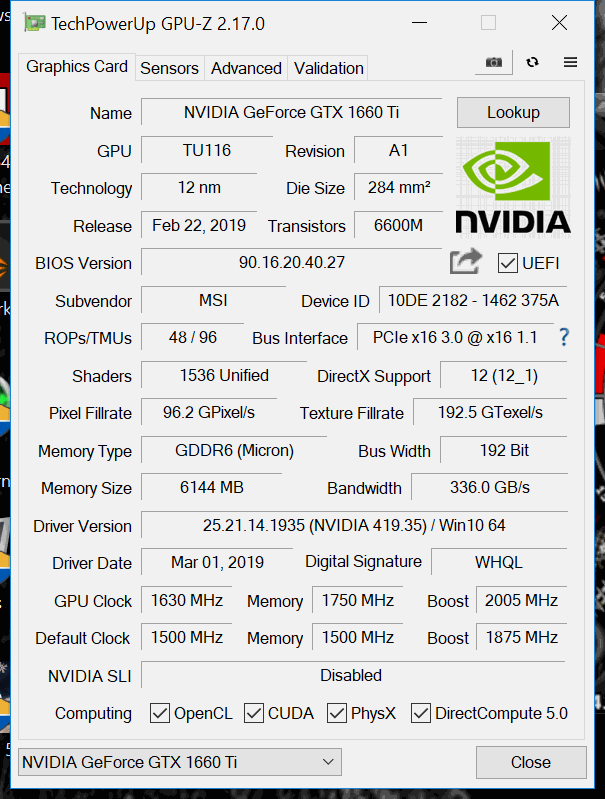
Priced in at $310 or ₹31,990 in India this card is as expensive as any GTX 1660 Ti gets today! Equipped with GDDR6 memory working in at 6000Mhz pushing through a 192 bit bus the GTX 1660 Ti comes with 1536 shader cores working along the TU116 GPU, this card has 25% less shader units than the RTX 2060 so expect lower performance here. On the bright side it is factory overclocked hence reaches upto 1875Mhz on the clock.


What's in the Box!? 


MSI has brought the GTX 1660 Ti Gaming X in a simple and sleek packaging with a thin cardboard box which carries black as the main color theme. We have a large MSI logo along with the card image in the center and the product name at eh bottom left corner with a highlight on the Twin Frozr 7 cooler implementation. And of-course the familiar GeForce GTX logo is back on the bottom right corner.


At the back you'll mostly find MSI telling you as much as they can about their new cooler and the Torx 3.0 fans and how the card is fast aswell as decorated with RGB lights all over the shroud.


Inside the box we are greeted with a humble yet adequate number of accessories, we get a bunch of Luck the Dragon stickers, a user guide, a booklet on how to install the graphics card, a thank you note, a driver CD and the actual card itself.


A Closer Look


MSI has ditched their red and black color scheme with the new RTX series cards and the same goes for the GTX 1660 Ti aswell which comes in a black and grey color scheme and looks pretty sleek for a card of its stature and price point.


The card even though is quite stealthy with its gun metal color scheme but you can still see that its original shroud design is from the previous generation only with a few minute changes here and there. It has a B2 bomber plane feel to it and the trims around the new fans have RGB strips that can be easily controlled via the MSI Mystic Lights software.


Measuring in at 247x127x46 mm this is a small card but does come with a backplate which has  a brushed aluminum finish to it giving it that extra bit of premium feel that is a must for the price tag for which this card comes at. But without a doubt this backplate is one of the most elegant ones out there and I personally love it since its that portion of the card which would be visible in most chassis.


Underneath you won't see any big heat pipes protruding outside the shroud and we have only three 6mm heatpipes running in and out of the heatsink which should be adequate to cool the TU116 chip underneath especially with the new Torx 3.0 fans on top which are 90mm each and going by their impressive past record should do just fine.


For power the MSI GTX 1660 Ti Gaming X relies on a single 8-pin PCIe power connector which gives it a 225W power draw capacity on paper however Nvidia even though without any reference model out there rates the GTX 1660 Ti at 120W and same is the case with this one too making it an immensely power efficient card. However some AIBs can by default bump this limit by 10W or so.


The IO shield on the MSI GTX 1660 Ti Gaming X has four ports namely as one HDMI 2.0a port and three DisplayPorts 1.4 that are 1.4a ready hence can support upto 8K 60Hz display. The DVI port is long gone which makes this card both slim and also leaves more room for exhaust vents which might be a part of MSI's mastering aerodynamics plan with this card.


Benchmarks and Overclocking 


Installing the MSI GTX 1660 Ti Gaming X was easy and it powered up like a
breeze once we booted up the system. Since this is a very short card one won't have any issues when installing it in most to any case out there which is how it should be for a mainstream card.

GPUZ reported the correct frequencies with 1500Mhz on the clock and
1500Mhz on the memory with boost reaching 1965Mhz courtesy to GPU Boost
4.0


For testing the MSI GTX 1660 Ti Gaming X graphics card our new test bench was as follows -


CPU: AMD Ryzen 7 1800X @3.9Ghz

Motherboard: Asus X370 Crosshair VI Hero

RAM: Corsair Vengeance RGB Pro 32GB 3200Mhz

Cooler: Cooler Master MasterLiquid ML240R RGB

Graphics Card: MSI GTX 1660 Ti Gaming X

Storage: Kingston A400 256GB

Secondary Storage: Corsair Neutron XTi 480GB

Power Supply: Corsair AX860i 860W

Case: Cooler Master H500M

OS: Windows 10 Pro 64-bit

Sleeved Cables: TweakedPC


Overclocking any Turning architecture card right now is not the easiest of affairs in
terms of reaching high frequencies as Nvidia has locked the power target
on these cards which is 107% in case of the MSI GTX 1660 Ti Gaming X. This greatly
limits one to add more numbers to the frequency to the GPU or the memory
due to deficiency of maximum power supplied. My sample isn't the best
out of the lot and hence I could only manage a 130Mhz increase on the
clock along with a 1000Mhz on the memory and anything more than that mostly resulted in crash, system
freezes or poor results so we settled down to 1630Mhz on the clock and 2085Mhz as the
boost frequency which kept us in the 2025Mhz to 2040Mhz range in game
courtesy to GPU Boost 4.0 at default fan curve.


3DMark Fire Strike & Time Spy


Fire Strike and Time Spy by 3D Mark is a test suit that plays a
cinematic scene to determine the FPS, GPU temperature and CPU
temperature scaling everything via a cumulative score. It is a great
tool to benchmark your GPU since the render is mostly GPU & memory
dependent.


Shadow of the Tomb Raider


Shadow of the Tomb Raider is an action-adventure video game developed by
Eidos Montréal in conjunction with Crystal Dynamics and published by
Square Enix. It continues the narrative from the 2015 game Rise of the
Tomb Raider and is the twelfth mainline entry in the Tomb Raider series.

Based off the Dynamics' proprietary Foundation engine like its
predecessor SOTTR is a visual treat and heavily optimized for PC
platform. We are running it at Highest graphical preset in
DX12 mode benchmarked using the game's build in tool.


Far Cry New Dawn


Far Cry New Dawn uses an enhanced version of the Dunia 2 engine. Unlike its predecessor the
game now uses DirectX 12 API, the development team have optimized the game
extensively to take advantage of hardware capabilities. Furthermore, Far
Cry New Dawn is a testament to achieving proper visual fidelity while keeping
overall polygon count in check. Testing is done at Ultra preset using the build in benchmark to keep the results
standardized.


Assassin's Creed Odyssey


Assassin's Creed Odyssey is a 2018 action role-playing video game
developed by Ubisoft Quebec and published by Ubisoft. It is the eleventh
major installment, and twentieth overall, in the Assassin's Creed
series and the successor to 2017's Assassin's Creed Origins.

Using the AnvilNext 2.0 graphics engine the game
though better optimized than Origin is still very taxing even on the
best of systems out there. We are running the game's build in benchmark
at Ultra presets.


Battlefield V


Battlefield V is a first-person shooter video game developed by EA DICE
and published by Electronic Arts. Battlefield V is the sixteenth
installment in the Battlefield series.

Masking use of the ‎Frostbite 3 engine the game is extremely beautiful
both in terms of graphics and story-line, I've tested the game in D3D12
mode at maxed out settings on full HD resolution.


Metro: Exodus


Metro Exodus is a first-person shooter video game developed by 4A Games and published by Deep Silver. Not only is this the first game ever to implement ray tracing global illumination and DLSS simultaneously but this game can beat any modern day PC hardware to its knees and can rightfully be called the present day Crysis. We are running it at Ultra presets with Hairworks on and Tessellation set to full using the game's build in benchmarking tool.


Thermals 


The MSI GTX 1660 Ti Gaming X runs cooler than most other GTX 1660 Ti cards out there mainly due to the dense fin stack along with the two Torx 3.0
fans that are more than adequate to cool a card of this category with a 120W TDP rating hence, keeping it well off the thermal throttling mark when at
stock or manually overclocked even when its inside a closed chassis such
as the Cooler Master H500M and not on an open test bench. The card was
allowed to run with the default fan curve & the temperature readings
are taken in a strictly controlled environment with ambient temperature at 25°C.


My Verdict


Nvidia finally brought out something to the table that is near perfect and fitting to be a successor of the previous 10 series. The card offers exactly what one expects from a new launch and gives a great price to performance ration which is sweetened by the fact that it does what its promises to do, offering great rasterization in-game performance. Coming to the MSI GTX 1660 Ti Gaming X in hand we have a winner in its own right without a shadow of a doubt, the card is absolutely a slayer in almost every area!


The card looks great with its all new gun metal stealth design and the new Torx 3.0 fans do their job well keeping the card cool and quiet hence sustaining higher and stable clocks. For a near $300 card we get the best 1080p performance we've seen in a while for this price where the GTX 1660 Ti offers GTX 1070 like performance at lower price and power draw. Its a great card for professional eSport players who value high refresh rates at full HD for their games and even for those who are looking for a card that can drive their games at that magical 60FPS on a 1440p display across a wide variety of titles with a minor tweak in the settings.

Overclocking wise I'm quite impressed as its easy to dial the frequencies up even with that 107% power limit and we can get even better performance without heating up the card too much so noise or ventilation isn't a factor to count in here. The only down side on the MSI GTX 1660 Ti Gaming X is its price point that makes it one of the most expensive 1660 Tis in the market and it hovers dangerously close to the RTX 2060 price tag which offers superior raw gaming performance not to mention the benefits of ray tracing no matter how broke that might be right now!


"MSI has done a superb job in crafting the GTX 1660 Ti Gaming X with cool
industrial looks, efficient cooling solution and great software support which is only plagued by its high price tag. So if you want a card with subtle looks and RGB lights that offers blistering fast performance right
out of the box for high refresh rate 1080p panels then the MSI GTX 1660 Ti Gaming X is the card for you!"


Pros - 


  • Solid Build Quality 

  • Subtle RGB implementation 

  • Overclocked out of the box

  • Good 1440p performance

  • Runs cool and quite

  • Meant for high refresh rate 1080p panels


Cons - 


  • Price tag is on the higher side


I give it a 8/10 earning our Gold Award!


Read More
  • Share This:  
  •  Facebook
  •  Twitter
  •  Google+
  •  Stumble
  •  Digg
Bài đăng cũ hơn Trang chủ

Popular Posts

  • Platinum #345: Word Search by POWGI (EU Vita)
    Hey there! If you like word search, you must play this game. This 324 puzzles will keep you busy for a while. What is the game all about? Th...
  • Penjelasan Kode REGION Pada PlayStation 4
    Apa sih sebenarnya kode "Region" dalam PlayStation itu? Para user yang baru memiliki PS4 tentunya akan bingung tentang hal ini, p...
  • Platinum #301+302: Hex Tunnel Touch (EU & NA)
    Hey there! Once you get used to its awful controls, this game is very easy and can be beaten in half an hour or less. What is the game all a...
  • Review Indie Game: Sigi - A Fart for Melusina (PS4)
    Sigi - A Fart for Melusina merupakan sebuah game 2D plat former adventure buatan dari  pixel.lu , game ini bercerita kan tentang petualanga...
  • Corsair Carbide SPEC-OMEGA Review
    The Corsair SPEC Omega - Bling...Beauty...Boldness! Corsair took the market by storm when it released the SPEC Alpha in 2016 mid tower gamin...
  • PlayStation 4 (PS4) Angry Birds Star Wars Gaming Review Complete
                Release Date: Out Now       Genre: Family / Strategy       Publisher: Activision, Inc.       Developer: Exient, Rovio Rovio r...
  • Platinum #261+262: MotorStorm RC (PS3 & Vita)
    Hey there! This game has been in my backlog long enough. It wasn’t the easiest Platinum but hey, the second one was for free! :-) What is th...
  • CORSAIR Launches New Carbide Series SPEC-04 Tempered Glass Mid-Tower Gaming Case
    Bold and Beautiful - CORSAIR Launches New Carbide Series SPEC-04 Tempered Glass Mid-Tower Gaming Case BENGALURU, India - October 27, 2017 CO...
  • HyperX Unleashes Predator DDR4 RGB With Infrared Sync Technology
    HyperX®, the gaming division of Kingston Technology, today announced the launch of Predator DDR4 RGB featuring industry-leading, patent-pend...
  • 100% #57: Minefild (EU)
    Hey there! Beating a level in large and hard mode can be a bitch. The rest is very easy. What is the game all about? Minefild is a simple M...

Gagal Membeli Game Digital Di PSN Store Menggunakan Kartu Debit

Sebelumnya saya mau cerita intermezzo dulu , pada awalnya saya biasa transaksi membeli game digital mengunakan kartu debit Bank BTN , selama...

Tìm kiếm Blog này

Được tạo bởi Blogger.

Lưu trữ Blog

  • tháng 6 2019 (2)
  • tháng 5 2019 (13)
  • tháng 4 2019 (12)
  • tháng 3 2019 (3)
  • tháng 2 2019 (11)
  • tháng 1 2019 (15)
  • tháng 12 2018 (14)
  • tháng 11 2018 (5)
  • tháng 10 2018 (10)
  • tháng 9 2018 (26)
  • tháng 8 2018 (18)
  • tháng 7 2018 (31)
  • tháng 6 2018 (23)
  • tháng 5 2018 (18)
  • tháng 4 2018 (16)
  • tháng 3 2018 (27)
  • tháng 2 2018 (26)
  • tháng 1 2018 (39)
  • tháng 12 2017 (20)
  • tháng 11 2017 (54)
  • tháng 10 2017 (15)
  • tháng 9 2017 (18)
  • tháng 8 2017 (14)
  • tháng 7 2017 (9)
  • tháng 6 2017 (9)
  • tháng 5 2017 (7)
  • tháng 4 2017 (10)
  • tháng 3 2017 (23)
  • tháng 2 2017 (7)
  • tháng 1 2017 (5)
  • tháng 12 2016 (1)
  • tháng 11 2016 (8)
  • tháng 10 2016 (25)
  • tháng 8 2016 (5)
  • tháng 7 2016 (3)
  • tháng 6 2016 (4)
  • tháng 2 2016 (9)
  • tháng 1 2016 (3)
  • tháng 11 2015 (1)
  • tháng 10 2015 (2)
  • tháng 9 2015 (3)
  • tháng 8 2015 (3)
  • tháng 1 2015 (1)
  • tháng 8 2014 (6)
  • tháng 3 2014 (2)
  • tháng 2 2014 (2)
  • tháng 12 2013 (3)
  • tháng 11 2013 (1)
  • tháng 10 2013 (3)
  • tháng 9 2013 (5)
  • tháng 8 2013 (5)
  • tháng 6 2013 (13)
  • tháng 5 2013 (21)
  • tháng 4 2013 (6)
  • tháng 3 2013 (9)
  • tháng 2 2013 (14)

Nhãn

  • ;ego jurassic world
  • #
  • 1 HOUR PLATINUM TROPHIES
  • 100% Games
  • 2013
  • 2015
  • 2016
  • 2017
  • 2018
  • 2019
  • 3D
  • A
  • AAA Game Review
  • Action Game
  • Activision
  • assassin's creed IV ps4
  • Bajakan
  • Bank BTN
  • Batman 3 - Beyond Gotham
  • Batman 3 - Beyond Gotham ps4
  • Batman 3 - Beyond Gotham review
  • batman 3 ps4 review
  • Berita
  • Best Of PlayStation 4
  • best ps4 action game
  • Best PS4 Games For 2016
  • Best PS4 Games For 2017
  • best ps4 games for teens
  • Budget Gaming PC
  • Call of Duty :Black Ops III
  • Call of Duty :Black Ops III ps4
  • Call of Duty :Black Ops III ps4 bundle
  • call of duty black ops 3 release date
  • call of duty ghosts ps4
  • call of duty ps4
  • cheat
  • Components
  • Computer
  • Computer Utility
  • daftar poker
  • DAFTAR POKER ATAU DOMINO
  • Debut
  • destiny ps4
  • Digital
  • download
  • Download Iso
  • E
  • EA Sports
  • Electronic Arts
  • Emulator
  • Engine
  • F# 5.05
  • fallout 4 ps4
  • fallout 4 review
  • fallout 4 strategy
  • fallout 4 tips
  • fifa 16 career mode
  • fifa 16 demo
  • fifa 16 PS4
  • fifa 16 release date
  • fifa 16 review
  • fifa 16 trailer
  • fifa 17 reiview ps4
  • fifa 17 review
  • Fighting
  • final fantasy
  • final fantasy ps4
  • final fantasy XV
  • Fraud
  • Gagal
  • Game
  • GAME ONLINE
  • Games
  • gaming
  • Gaming PC
  • Gatget Review
  • Graphic Cards
  • Gratis
  • Hardware
  • HDD
  • http://cheatstationer.blogspot.com
  • Indie Games Review
  • Infinity Ward
  • INFO
  • Info Handheld 3DS
  • Info PS4
  • Info TV
  • iso
  • Jual
  • just dance 2016 deluxe
  • just dance 2016 ps4
  • just dance 2016 review
  • Kids
  • killzone ps4
  • knack ps4
  • knack ps4 review
  • Knowledge
  • lego jurassic park
  • lego jurassic world game
  • Limited Physical Releases
  • madden nfl 16
  • madden nfl 16 bundle ps4
  • madden nfl 16 deluxe edition
  • madden nfl 16 release date
  • madden nfl 17 ps4
  • madden nfl 17 review
  • Mandiri
  • minecraft PS4
  • minecraft ps4 trailer
  • minecraft review
  • mlb 15 limited edition
  • mlb 15 ps4
  • mlb 15 review
  • mlb15 the show review
  • MOBILE
  • Movie Review
  • My Story
  • Mystery
  • Naughty Dog
  • nba 2k16 ps4
  • nba 2k16 release date
  • nba 2k16 review
  • nba 2k17
  • New
  • new final fantasy
  • new ps 4 games
  • new ps4 games
  • new ps4 games for kids
  • News
  • nhl 16 release date
  • nhl 16 review
  • Nintendo Switch
  • online shoop
  • Only On PS4
  • Other
  • PC
  • PC Assembly
  • Platinum Trophies
  • playstation 4
  • playstation 4 games
  • Portable Console
  • power
  • processors
  • project cars list
  • Project CARS PS4 review
  • ps 4 sports games
  • PS Plus
  • PS Vita Games
  • PS+
  • ps2
  • PS3 Games
  • ps4
  • ps4 4 racing games
  • ps4 action game
  • PS4 action games
  • PS4 Bajakan
  • ps4 bundle destiny
  • ps4 call of duty
  • ps4 dance games for kids
  • ps4 fan club
  • PS4 Fifa 17
  • ps4 fighting game
  • PS4 fighting games
  • ps4 football games
  • ps4 games
  • ps4 games for everyone
  • ps4 games list
  • PS4 Lego games
  • ps4 lego star wars
  • PS4 Original
  • ps4 racing games
  • ps4 release date
  • ps4 shooting game
  • ps4 shooting games
  • ps4 specifications
  • ps4 sports games
  • PS5
  • PSN Store
  • ratchet and clank ps4
  • ratchet and clank review
  • ratchet and clank trailer
  • retro games
  • Review
  • Reviews
  • Rumor dan isu
  • SDD
  • Sledgehammer Games
  • Sony Interactive Entertainment
  • Spider Man
  • Sports
  • SSD
  • Star Wars Battlefront
  • Star Wars Battlefront ps4
  • star wars battlefront ps4 bundle
  • Star Wars Battlefront PS4 Trailer
  • Star Wars The Force Awakens review
  • Star Wars The Force Awakens trailer
  • Star Wars:The Force Awakens PS4
  • STORY
  • Strategy
  • Summing Up the Past
  • temperature
  • the crew ps4
  • Tips and Trick PS4
  • tips and tweaks
  • Trip and Trick PS4
  • Trophy Guides
  • Ubisoft
  • uncharted 4 review
  • Unchartered 4 : A Thief's End Collectors Edition
  • UPS
  • video games
  • watchdogs ps4
  • win a playstation 4
  • WTS

Báo cáo vi phạm

  • Trang chủ

Giới thiệu về tôi

Unknown
Xem hồ sơ hoàn chỉnh của tôi

Copyright © PS4 Pro Games | Powered by Blogger
Design by Hardeep Asrani | Blogger Theme by NewBloggerThemes.com | Distributed By Gooyaabi Templates