PS4 Pro Games

Ganti Nama PSN Akan Segera Hadir di PS4

 tháng 10 16, 2018     Info PS4     No comments   

Mengganti nama PSN ID terdengar begitu sepele bagi saya, namun menurut data yang saya dapat, mengganti nama PSN ini merupakan salah satu hal yang paling diinginkan dari para member Playstation. Kenapa bisa seperti itu?, sebenarnya kalau kita perhatikan di nama-nama PSN banyak sekali nama ID yang terdengar konyol dan susah untuk dibaca seperti "2inthepink1inthestink" atau "lasergoespewpew" dan tentunya masih banyak id-id lain yang terdengar sangat lucu.
Sebenarnya hal ini terjadi karena dulu mungkin saat pertama kali membuat id PSN kita masih kecil dan tidak terlalu mementingkan seperti apa nantinya id kita, jadi asal-asalan saja membikin sebuah nama misal "bigdangleyballs!lol" dan ternyata id tersebut kita gunakan dalam jangka waktu lama hingga sampai sekarang, hal ini tentunya akan membuat malu kita saat di tanya oleh teman, apa id PSN kamu? dan jawabnya "bigdangleyballs!lol". Hal ini juga terjadi pada saya, id PSN saya "Hyde6666_larc" terbilang susah untuk diucapkan atau di share, sebuah id yang pertama kali saya buat di PS3 sekitar bulan Desember 2011, dengan nama yang diambil dari potongan grup band Jepang favorit saya.
Kabar gembira baru saja berhembus, beberapa minggu ini Sony secara resmi mengumumkan kalau kita nantinya bisa mengganti nama dari PSN id kita, sekarang program ini sedang dalam masa Beta Tester dan kemungkinan fitur ini akan tersedia di awal 2019. Pergantian id PSN ini pertama akan gratis, dan setelah yang kedua kali bagi non member PS+ akan dikenakan biaya 9.99$ (Rp.139.806) dan bagi para pelanggan PS+ dikenakan biaya 4.99$ (Rp.69.860).
Saat kita sudah mengganti nama PSN id, Sony juga memberikan pilihan untuk menampilkan id lama di sertai dengan id baru, ini bertujuan agar teman-teman lama kita masih tau kalau id baru tersebut milik kita yang sudah berganti dengan id baru. Fitur ganti id ini akan berlaku untuk semua game-game keluaran mulai bulan April 2018. Jadi game-game online sebelum bulan tersebut tetap akan menampilkan id PSN lama kita. Hal ini sudah di diskusikan dan di sinkronkan juga dengan para developer game, dan tentunya mungkin masih ada beberapa bug-bug yang akan terjadi jika kita bermain game online. Namun jika memang terlalu banyak masalah kita tetap bisa kembali ke ID lama kita.
Jadi jika ada teman-teman ingin mengganti nama id PSN nya mungkin sudah bisa mulai dipikirkan dari sekarang nantinya akan menggunakan nama baru apa, kalo saya sih belum tau apa mau dirubah atau tidak, belum dapat nama yang bagus juga dan rasanya sayang aja sudah menggunakan nama id ini sejak lama. 
Read More
  • Share This:  
  •  Facebook
  •  Twitter
  •  Google+
  •  Stumble
  •  Digg

Apakah Aman, Charging DualShock 4 (DS4) Menggunakan Charger Handphone?

 tháng 10 15, 2018     Tips and Trick PS4     No comments   


Controller DualShock 4 atau lebih dikenal dengan singkatan DS4 merupakan Controller yang kita gunakan dalam bermain PS4, namun kendala dari DS4 ini adalah ketahanan batre yang terbilang cukup lemah dibanding DS3 milik PS3. Banyaknya fitur dan sensor pada DS4 membuat penggunaan baterai yang cukup boros sehingga kita akan semakin sering dalam mengecas DS4 kita, sangat menyebalkan rasanya jika saat sedang asik bermain game tiba-tiba DS4 kita terputus koneksinya karena kehabisan batre. 

Salah satu alternatifnya tentu kita bermain sambil ngecas menggunakan kabel pendek (1.5m) yang sudah disediakan oleh Sony, namun tentunya karena kondisi kabel yang pendek membuat kita merasa tidak nyaman karena harus terlalu dekat dengan layar TV. Alternatif lainnya tentunya kita harus merogoh kocek lebih dalam untuk membeli aksesoris tambahan Charging Docks dengan range harga 150 - 400rb.
Namun sebenarnya kita bisa menggunakan alternatif termurah yakni menggunakan charger dari handphone kita, namun sebelum itu ada beberapa hal yang perlu diperhatikan terlebih dahulu sebelum kita mengecas DS4 menggunakan charger handphone. Berikut ini akan saya jabarkan.

DualShock 4 membutuhkan daya 5v - 800mA (atau 0.8A)


Dari keterangan di atas bisa disimpulkan bahwa, DS4 membutuhkan daya 5v untuk bisa bekerja dengan normal dan melakukan cas pada baterai dari DS4. Sedang 500mA merupakan arus yang dibutuhkan.

Jadi misal saya memiliki 2 charger :
1. Charger Handphone Sony dengan Output DC 5v - 2.1A.
2. Charger PS Vita dengan Output DC 5v - 1.5A.


Apakah kedua charger di bisa di gunakan? jawabannya adalah tentu BISA, selama adaptor itu memiliki daya 5v dan nilai Amperenya SAMA atau LEBIH BESAR, maka charger tersebut bisa digunakan. Biasanya kalau Amperenya besar maka proses chargingnya akan memakan waktu lebih cepat.

Bagaimana jika saya memiliki Power bank dengan Output DC 5v - 2A, maka akan sama seperti di atas power bank tersebut tetap BISA kita gunakan untuk charging DS4 kita. Namun saya tidak merekomendasikan melakukan charging menggunakan powerbank sering-sering karena banyak beredarnya Power bank KW yang mana arus listrik yang mengalir dari baterai di dalam power bank ke baterai DS4 tidak stabil. Power bank yang benar-benar bagus dan bermerek biasanya mahal. 
Jika ada kasus saya memiliki charger handphone lama dengan daya Output 5v - 500mA (05.A), apakah bisa di gunakan, jawabnya tentu bisa juga, TAPI karena Amperenya kecil jadi proses charging akan memakan waktu lebih lama, dan misalkan kita bermain game sambil charging menggunakan output ini makan biasanya DS4 akan mati kehabisan batre, karena daya yang masuk lebih kecil dari pada daya yang keluar.
Yang sering jadi masalah adalah saat kita menggunakan charger handphone yang memiliki fitur Fast Charging, fitur ini biasanya memiliki 2 output tegangan, yang pertama adalah 5v (utk normal charging) dan 9v (untuk fast charging nya), saat kita menggunakan charger model ini biasanya DS4 akan terasa sangat panas dan akhirnya terbakar, setelah dingin dan biasanya tidak bisa digunakan lagi. Jadi saya sarankan untuk menghindari charger tipe ini.

Untuk awet tidaknya DS4 saat di cas menggunakan charger handphone, saya sudah searching namun memang banyak pro dan kontra,  ada yang tidak masalah selama bertahun-tahun dan ada yang mengalami kendala, namun kendala di sini saya baca-baca kemungkinan mereka menggunakan charger KW dan rata-rata merek Samsung yang secara tidak sadar ternyata memiliki fitur fast charging. Kalo menurut saya pribadi selama masih menggunakan charger yang memiliki kualitas bagus dan dayanya sesuai, harusnya DS4 kita tidak ada masalah. Yang jadi masalah karena diluar sana banyak beredar charger KW.

Sebagai tambahan informasi :
  • Daya 5v - 0.5A : Biasanya digunakan pada USB 2.0 pada laptop dan komputer. port USB berwarna hitam.
  • Daya 5v - 0.9A : Biasanya digunakan pada USB 3.0 pada PS4, laptop dan  komputer port USB berwarna biru.
  • Daya 5v - 1A : Biasanya digunakan pada charger Smartphone kita sekarang ini.
  • Daya 5v - 2A : Biasanya digunakan pada charger tablet, seperti iPad dan Samsung Note.
Battery pada DS4 memiliki daya 3.65V - 1000 mAh, dengan kondisi siklus pengisian :
  • Bertahan 1,200 – 1,500 kali charger dalam kondisi 50-100% battery
  • Bertahan 300 – 500 kali charger dari kondisi 0 ke 100% battery 
Jadi misal dalam 1 hari kita main dan baterai kita habis total lalu kita charge lagi hingga 100% maka umur dari DS4 kita cuma sekitar 1 tahunan lebih dikit aja, dari siklus diatas dapat diambil kesimpulan DS4 lebih sering kita charging makan umur baterai akan lebih awet. Dan tentunya semua barang elektronik memiliki umur yang akan habis jadi cepat atau lambat pasti akan rusak. Harga sparepart battery DS4 di tokopedia sekitar 100rb, ada juga battery yang memiliki daya 2000 mAh namun tentunya battery dengan daya segitu tidak standar.

*UPDATE 16 OKTOBER 2018
- Saya lakukan test charging DS4 dari 0-100% menggunakan charger 5v-2.1A membutuhkan waktu 2 jam 15 menit.


Sekian informasi dari saya semoga dapat bermanfaat.
Read More
  • Share This:  
  •  Facebook
  •  Twitter
  •  Google+
  •  Stumble
  •  Digg

Corsair GLAIVE RGB Review

 tháng 10 14, 2018     Budget Gaming PC, Components, Gaming PC, Reviews     No comments   


The Corsair Glaive RGB was a force to reckon with but is it still the ultimate gaming weapon after an year, time to find out!


Over the years I've reviewed a lot of products from Corsair including
that from their ever growing peripheral lineups which most of the time
happens to be quite top of the line, most of the time in performance but
every time in terms of pricing! With the recent release of the Corsair Harpoon RGB
they did take care of the entry segment but now its time to get into
the upper budget segment for gaming mice for which they'd
rolled out their Corsair Glaive RGB Gaming Mouse last year in 2017!

Thanks to Corsair India we happen to have one with us today so let's find out how sharp the edges of this weapon really are after a year of its launch and is it still worth your money.


Taking its name from an old European weapon that fitted at the end of a
stick and could be modified as per one's own usage and style, the
Corsair Glaive RGB looks to do pretty much the same by offering a
semi-modular nature by which you can choose between three different
grips according to your style and needs!

Technically speaking the mouse comes equipped with high-performance
custom made Pixart PMW3367 Optical sensor, adjustable DPI, six buttons,
Omron switches and more which you tend to find absent in most of the
gaming mice priced higher than the Glaive! Its now priced lower than its launch price and sits at around
$50 or Rs 5000 in India.

One thing I want to mention here is that the Glaive RGB comes in two
different options with one being full plastic and the other with
aluminum trims in the front. While all the other features remain the
same the normal one weighs at around 120g while the aluminum version has
127g of weight to it,  so pick the one which suits you most before
going for either one of them.


What's in the Box!?


Corsair Gaming components are now depicted by a black box with splashes
of yellow since that's what their signature color theme is. The packing
of the Corsair Glaive RGB Gaming Mouse is no different which also comes
in a sleek black windowed box with yellow in tits and bits all over. The
product image and Corsair logo are prominent along with the main
features such as 16000 DPI, interchangeable thumb grips and RGB back
lighting.

The back is similarly colored with a detailed marked diagram of the
mouse indicating towards its key physical characteristics such as
contoured shape, three zone multi color back lighting and onboard
memory. Its a nifty packing justifying a product of this stature and
does the job well in protecting it through transit.


Open the box and you'll be greeted by some accessories and paper works,
these include the warranty card and user manual, the Corsair Glaive RGB
mouse and another small case housing the two extra interchangeable grips
and a carry pouch for you to carry them along anywhere you go with
ease.


Let's take a Closer Look!


Corsair has designed the Glaive RGB as a full size-all grip style
friendly gaming mouse with the entire top covered by a matte black
silicon like finish for extra grip and comfort, its common these days
and shouldn't be much of a problem except for oil stains if you like to
munch around while using your PC! All the six buttons are Omron switches
which are rated at 20million click cycles so durability isn't an issue
over here, the left except for the aluminum trim in the front also
houses the two forward and backward buttons which are a bit depressed in
contrast to the default rubberized flat grip that the mouse comes with.
These are hard & have a very nice clock to them nothing too hard
nothing too soft.


The right side is simple with nothing much but the permanent
non-swappable textured rubber grip to rest your pinky or ringer finger
upon. It also has one of the three RGB lighting zones right above it,
we'll be discussing about that later on in the review.

The Corsair sails logo can also be seen at the back here which is RGB
backlit and is also one of the three lighting areas on this mouse.


Looking at the top we find the two right and left click buttons, on the
fly DPI change switch and a chunky scroll wheel. The left and right
clicks don't have a high actuation and sound just perfect when clicking
while the textured rubber wheel is a bit tight either while pressing
down or scrolling up-down which is fine by my standards but others might
need some practice to get used to it.

You would also see a five LED strip that indicate the various and at
present DPI level of the mouse.  By default it is programmed with 800,
1500, 3000, 6000, and 9000 DPI but sadly the color of the DPI indicator
stays blue only and can't be changed. The DPI levels can be customized
through the CUE software even by a single DPI if one wants that kind of
precision!


Now the entire story becomes clear when you look at it from the front,
the mouse is a contoured to the right and the left and right click
buttons are a bit curved upwards to prevent an accidental slip of
fingers while long gaming sessions. The front LEDs are grilled which is a
remanent of Corsair's own Scimitar gaming mouse.


At the bottom we have four teflon feet and the Pixart PMW3367 optical
sensor which is custom tailored for the Glaive and supports upto 16000
DPI which is don't think anyone would be desperately needing right now
even with a multi monitor setup but some extra doesn't hurt & you
can always customize these setting through CUE.

The cable on the Glaive RGB is 1.8m in length and is cloth braided with a
little stiffness to it. At the end you'll find the same USB connector
as that on all the Corsair Gaming Peripherals, its rubberized and
strongly build for longevity. I have a good amount of space on my table
so the wire's stiffness didn't pose any issues but for some it might so
try to get hold of a mouse bungee for yourself if possible to avoid any
hindrance.


About the CUE


Corsair has brought out an entirely new software suite with the Glaive
RGB Gaming Mouse. CUE as Corsair likes to call it is a suite to bind all
the three gears, namely as the Void Headset, MM800 Mousepad and K95
Platinum Keyboard, together as one taking a more holistic approach. CUE
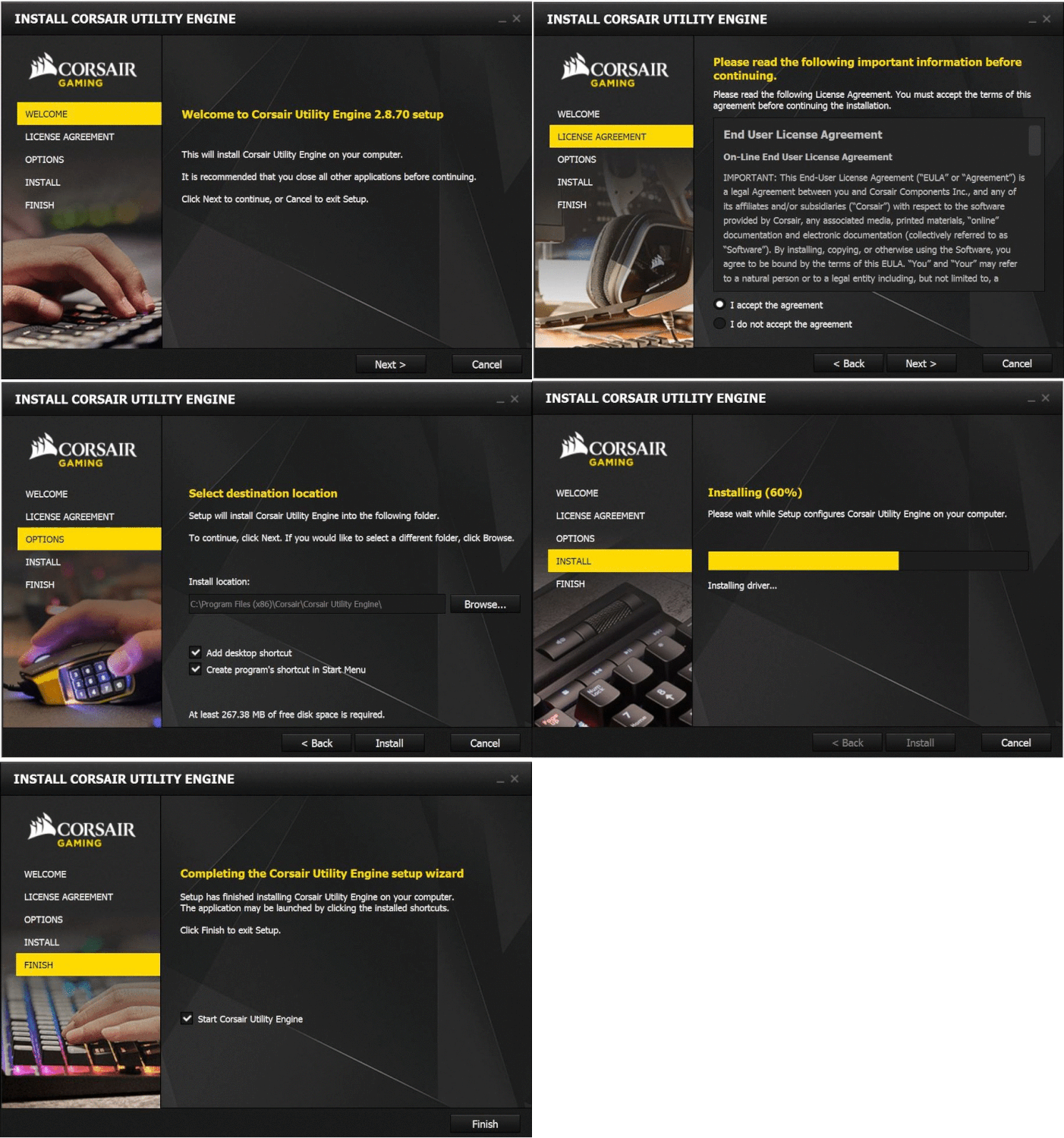
can be downloaded from the Corsair official website for free.


This new version of the CUE is quite well laid out and has all the
comprehensive and complex options hidden deep within. The demo devices
listed on the starting page are actually a bunch of emulators that users
can  use to get a feel of the lighting and various options available
for the enlisted peripheral. The top has an advanced button for bringing
down the more in depth options for the users & I personally advice
that one uses the same as its required to reap the full potential of
such a premium device!


The first one is the Actions section which let's you remap and reassign
buttons. Its simple section of the mouse but the real power of the CUE
and Glaive is seen when you enter the Macros section where you can
record macros for the mouse and use them by the click of a single
button. This is real handy for typing in texts during multiplayer
battles to your team mates for quick response.


Since its RGB so there has to be a dedicated section to lighting isn't
it!? In this section you can choose from the pre-defined patterns and
even select the speed. Interestingly since the mouse has three RGB
lighting areas you can customize their lighting patterns individually
giving you the ultimate custom experience!  In the advanced options you
can either make your own lighting pattern or just simply set it to
static if you are like me and don't want a distracting disco ball under
your palm during gaming.


DPI section is where you want to be for making your own DPI profile per
click of the button, not only can you set your own DPI values but the
Glaive sensor allows for one DPI selection aswell so you can go as
precise as one DPI if you want that kind of accuracy in your mouse.


The performance tab gives you the options such as lift height which you
should set according to your style and mouse pad size. High is what
comes by default but I found low as y preferred setting to prevent
rolling during gaming sessions but you can choose the one that best
suits you.


A surface calibration section is also there for the Glaive RGB in the
CUE which allows you to set the tune the sensor in accordance with the
kind of surface you are operating the mouse upon be it a bare table
surface or a mousepad. Just move the yellow logo on the screen while
keeping the meter in the green and the sensor would be calibrated within
seconds. I found it quite helpful & it did make a difference
especially on very different surfaces like glass or wood.


In the setting section you can customize the polling rate of the mouse
to your taste along with the brightness at which the RGB lights would
glow. Pretty straightforward & useful.

All these settings and customizations made on the Glaive RGB stay on the
mouse thanks to its on-board memory so you don't need to install the
CUE on every system you play on just plug in the mouse and all your
settings would work seamlessly!


The Grips and Lights


Before we test this mouse I would like to talk about the three
interchangeable thumb grips & three lighting areas that the Glaive
RGB comes with.


The Thumb Grips


You will get three distinct thumb grips with the Corsair Glaive RGB,
while one is pre-installed the other three are interchangeable according
to your preferences. One is a plain rubberized grip, the second one is
an angular textured grip while the third one is an extended rugged wing
shaped grip.

These grips are attached to the main body of the mouse via strong
neodymium magnets which makes swapping a seamless process with a perfect
fit.


While using the soft rubber grip is suitable to most users out there
including me it does leave a little more to ask in terms of comfort
considering the mouse still has two more options. The two buttons on the
side are accessible easily while using this grip and be it a palm grip
or claw grip the grip doesn't favor any specific style and is quite
neutral.


On the other hand the second grip which is angular and textured does
make it difficult to access the two buttons on the side as they get
depressed further inside the cavity due to the grips extra height. I
don't really find much use of this grip personally as it has more cons
than pros, if any. The only meaningful explanation to this grip is that
its suitable for people with extra large hands or for people who have
longer thumbs than normal otherwise this grip is not much sensible.


Coming over to the third one, the extended wing shaped textured grip
which happens to be my personal favorite aswell out of the lot. This is
by far the best grip I've come across and gives the mouse an entirely
new appeal in terms of performance aswell as looks. The side buttons are
easily accessible and I could rest my thumb easily at the side with
full control over the mouse making gaming marathon sessions or Photoshop
work a smoother and more comfortable task.

It is basically a palm grip favoring attachment so claw grippers would find it little to not at all useful. 


The RGB Lights


The Corsair Glaive RGB comes with three RGB lighting areas which can be
individually customized customized both in terms of patterns and colors
through the CUE software.


First one is the side LEDs out of which the left side one happens to be
decorated by a glossy trim aswell as a highlight while the right one is
depressed and peeks out through a slit giving it an entirely different
look. The second are is the Corsair Sails logo which is obviously
engraved into the body and has a sharp light to it which is nor too dull
nor too fuzzy but just perfect ore like a laser light. The lights are
well diffused and don't create a distraction to the eyes nor looks too
over the top which tends to happen in some cases when so much of RGB is
employed.


The third and last are is in the front where the lights peek through two
grilled sections that throw light onto the surface where the mouse is
being used. Its really soothing and adds a sense of completeness to the
product especially in the dark when it helps you to see where the
mousepad is ending so that you accidentally don't slip off the pad
making you lose a shot or battle!

My only complain with the Glaive's lighting effects are that you can't
change the color of the DPI indicator which happens to stay blur all the
time. This not only creates a hindrance in the entire RGB scene here
but also makes it look sub par to Corsair's own standards of RGB
implementations.


Performance - Time to put it to Test!


Whenever I review a keyboard or mouse I like to use the device for
atleast a week putting it through my daily usage varying across the
week. My usage for mice range from simple navigation across the
explorer, web browsing, photo editing and even gaming when I get the
time to mainly engaging in FPS, Open World and Strategy.


Comfort Level


Its a big gaming mouse and by big I don't mean its humongous but its
inclined more towards palm grippers than claw grippers. People who have
small hands would find it tough for palm grip but people like me who
have medium size hands or those who have large palms would likely find
it more comfortable if sticking to a palm or even claw grip since there
is enough space to rest your tiny finger on the side & for the thumb
on the changeable grips which makes it a joy for long gaming sessions.
The buttons on the side are reachable and can even be pressed by the
thumb joint at times, they are hard and give a nice feedback upon
pressing.

The rubber is comfortable and does offer significant grip without being
sweat inducing that rubber surfaces are some times. Even though the
mouse weighs in at 127g it feels quite light in my hands and easy to
swift and glide or even pick and place back in case I run out of mouse
pad area! The weight preference might differ from user to user though.


Gaming and Daily Usage


For gaming the Glaive RGB is just perfect especially for FPS and
strategy since at higher DPIs you can move real quick for rapid response
in games like PUBG, Battlefield 1 and Resident Evil 7: Biohazard or skim through the massive
battlefield swiftly in CnC Kane's Wrath! On the go DPI switch works
really nicely and I found it more comfortable in the 6000 DPI range both
for gaming and daily use anything above that was a bit too much for
taste and my 1080p screen.

Putting it through my daily use was a good decision when it comes to
navigation & surprisingly the mouse registers even the slightest of
movements considering how powerful the sensor is making it a perfect
mouse for Photoshop or other graphical editing work where mouse
precision is paramount. Overall the Corsair Glaive RGB might be the best
mouse I've used till date in this price range especially once you put
on the extended thumb grip.

One strange thing that I observed after long term usage of the mouse is that the Corsair sail's logo on the mouse tends to get warm after a few hours of continuous usage which kind of feels weird under the palm to say the least. It really doesn't effect the performance but can cause discomfort to a few people over the stretch.


My Verdict


Coming in at $50 or Rs 5000 in India the Corsair Glaive RGB is downright
one of the best gaming mouse in its category even an year after its launch and in some cases the very
best possible! It is a full size mouse which is already a treat for
users like me who have medium-thick hands to users who have large palm
size. The tailor made PMW3367 sensor is nothing less than perfection for
this mouse and does the job beautifully at all DPI settings and a 16K
DPI support along with single DPI change is a great addition to the
bundle even though anyone would solemnly need them.

Weight wise the mouse is on the heavier side which is fine with me since
I like my mouse a bit heavy and Corsair does provide two weight options
on the Glaive so you sure have an option to chose from. Coming to the
three interchangeable thumb grips I'm pretty much pleased by all of them
and realized that not only do they give you the option to chose the
best one for your style but one can also switch between the two
depending upon their apparent work like I loved the stock one for daily
use and the extended one for gaming sessions. CUE or the now newer iCUE software is as usual
great but my only complaint with the Glaive RGB is the blue color only
DPI indicator, it just feels so out of place and sub par at times for a
mouse of this stature and brand.


"All in all for me Corsair still has the ultimate blade in form of the
Glaive RGB, that can easily slice through the competition with its wide
variety of features, tank like build quality, pitch perfect performance
and extravagant yet useful RGB LEDs."

Pros - 


  • Solid build quality 

  • Three grips for each type of gripping style as well as working style

  • Sensor is quite accurate and smooth 

  • Available in two colors, black and aluminum


Cons - 


  • The DPI lights are solid blue and non RGB   

  • No weight adjustment feature

  • The Corsair sail's logo gets warm after a few hours (Subjective)


I give it a 8.5/10 earning our Gold Award!


Read More
  • Share This:  
  •  Facebook
  •  Twitter
  •  Google+
  •  Stumble
  •  Digg

Akhirnya PS5 Dikonfirmasi Sony

 tháng 10 12, 2018     Info PS4     No comments   

PS4 sudah memasuki tahun ke-5 (2013-2018), tentunya kita sebagai user selalu bertanya-tanya kapan konsol penerusnya akan di keluarkan, munculnya PS5 sebenarnya sudah di konfirmasi oleh preseiden dan CEO Sony, Kenichiro Yoshida mengatakan "Pada saat ini, apa yang bisa saya katakan adalah kami (Sony) perlu memiliki perangkat next-gen" dari kutipan di atas sudah menunjukkan kalau sebenarnya PS5 sudah siap untuk diumumkan di E3 2019, dan kemungkinan akan tersedia di September 2020.
Berita ini sebenarnya sudah diperkuat dengan keterangan dari sebuah developer game yang sudah memegang dev kit dari PS5, sengaja developer game di berikan dev kit terlebih dahulu untuk membuat game untuk console tersebut, anggaplah dalam membuat game paling cepat 2-3 tahun, jadi ya tepat saja kalau tidak 2020-2021 PS5 siap untuk dipasarkan.
Di Forum PS4ID sudah muncul beberapa kemungkinan harga, supaya kita bisa menabung lebih awal, kemungkinan harga awal saat di release adalah 7jt dan kemungkinan harga kasetnya adalah 900rb. Untuk spesifikasi mesin tentunya kita berharap sony akan menggunakan spesifikasi tertinggi di tahun perilisannya.
Untuk games yang akan release di PS5, kemungkinan sperti Death Stranding, Ghost of Tsushima, Cyberpunk 2077, Call of Duty/Battlefield Series, FIFA 2021, PES 2021, Final Fantasy 7 Remake, Starfield, The Elder Scrolls 6 dll.
Munculnya rumor PS5 ini sebenarnya menurut saya kurang mengenakkan, Kalo saya pribadi sih masih cukup puas dengan PS4 Pro, dan varian gamenya.
Read More
  • Share This:  
  •  Facebook
  •  Twitter
  •  Google+
  •  Stumble
  •  Digg

The introduction & trailer of Red Dead Redemption 2 for the PS4

 tháng 10 04, 2018     2018, New, Only On PS4, Strategy     No comments   


The introduction & trailer of Red Dead Redemption 2 for the PS4.... is coming soon


Red Dead Redemption 2 is a different game developed in the Western style by the famous company Rockstar. Red Dead Redemption 2 plays for the PS4 in the Wild West and you're free to do missions; using a horse and a gun and even a bow and arrow. . The main character of the game is John McCain. He was a farmer and his wife and children were captured by the US government to use them as a means of persuading them to do their jobs. There is no other way except cooperation and obedience, except that three of its former members of the gang would be killed in order to escape.

The open-ended Red Dead Redemption 2 PlayStation 4 lets you search freely on the map, help horses and gadgets, and travel even between countries. Excellent imaging and soundtrack, as well as the fantastic and emotional story of the game are carved into the hearts of many gamers and can be said to be one of the best games of its genre. The previous version of this game is a continuation of John's story and adventure that occurs in the wild west or the United States. The game maker's explanations are astonished and they have stated that:
In the game you are free to do whatever you want to do, but be careful because everyone is behind the law and hires every law to win you.

Features of the PS4 Red Dead Redemption 2:
·        Western and simulated environment
·        Famous story characters
·        Continue past versions
·        Soundtrack and fantastic graphics
·        Beautiful and emotional story
·        It has a genre of virtual life
expansion, The Lost Legacy, was released in 2017.


Read More
  • Share This:  
  •  Facebook
  •  Twitter
  •  Google+
  •  Stumble
  •  Digg
Bài đăng mới hơn Bài đăng cũ hơn Trang chủ

Popular Posts

  • Platinum #345: Word Search by POWGI (EU Vita)
    Hey there! If you like word search, you must play this game. This 324 puzzles will keep you busy for a while. What is the game all about? Th...
  • Penjelasan Kode REGION Pada PlayStation 4
    Apa sih sebenarnya kode "Region" dalam PlayStation itu? Para user yang baru memiliki PS4 tentunya akan bingung tentang hal ini, p...
  • Platinum #301+302: Hex Tunnel Touch (EU & NA)
    Hey there! Once you get used to its awful controls, this game is very easy and can be beaten in half an hour or less. What is the game all a...
  • Review Indie Game: Sigi - A Fart for Melusina (PS4)
    Sigi - A Fart for Melusina merupakan sebuah game 2D plat former adventure buatan dari  pixel.lu , game ini bercerita kan tentang petualanga...
  • Corsair Carbide SPEC-OMEGA Review
    The Corsair SPEC Omega - Bling...Beauty...Boldness! Corsair took the market by storm when it released the SPEC Alpha in 2016 mid tower gamin...
  • PlayStation 4 (PS4) Angry Birds Star Wars Gaming Review Complete
                Release Date: Out Now       Genre: Family / Strategy       Publisher: Activision, Inc.       Developer: Exient, Rovio Rovio r...
  • HyperX Unleashes Predator DDR4 RGB With Infrared Sync Technology
    HyperX®, the gaming division of Kingston Technology, today announced the launch of Predator DDR4 RGB featuring industry-leading, patent-pend...
  • 100% #57: Minefild (EU)
    Hey there! Beating a level in large and hard mode can be a bitch. The rest is very easy. What is the game all about? Minefild is a simple M...
  • Platinum #261+262: MotorStorm RC (PS3 & Vita)
    Hey there! This game has been in my backlog long enough. It wasn’t the easiest Platinum but hey, the second one was for free! :-) What is th...
  • CORSAIR Launches New Carbide Series SPEC-04 Tempered Glass Mid-Tower Gaming Case
    Bold and Beautiful - CORSAIR Launches New Carbide Series SPEC-04 Tempered Glass Mid-Tower Gaming Case BENGALURU, India - October 27, 2017 CO...

Gagal Membeli Game Digital Di PSN Store Menggunakan Kartu Debit

Sebelumnya saya mau cerita intermezzo dulu , pada awalnya saya biasa transaksi membeli game digital mengunakan kartu debit Bank BTN , selama...

Tìm kiếm Blog này

Được tạo bởi Blogger.

Lưu trữ Blog

  • tháng 6 2019 (2)
  • tháng 5 2019 (13)
  • tháng 4 2019 (12)
  • tháng 3 2019 (3)
  • tháng 2 2019 (11)
  • tháng 1 2019 (15)
  • tháng 12 2018 (14)
  • tháng 11 2018 (5)
  • tháng 10 2018 (10)
  • tháng 9 2018 (26)
  • tháng 8 2018 (18)
  • tháng 7 2018 (31)
  • tháng 6 2018 (23)
  • tháng 5 2018 (18)
  • tháng 4 2018 (16)
  • tháng 3 2018 (27)
  • tháng 2 2018 (26)
  • tháng 1 2018 (39)
  • tháng 12 2017 (20)
  • tháng 11 2017 (54)
  • tháng 10 2017 (15)
  • tháng 9 2017 (18)
  • tháng 8 2017 (14)
  • tháng 7 2017 (9)
  • tháng 6 2017 (9)
  • tháng 5 2017 (7)
  • tháng 4 2017 (10)
  • tháng 3 2017 (23)
  • tháng 2 2017 (7)
  • tháng 1 2017 (5)
  • tháng 12 2016 (1)
  • tháng 11 2016 (8)
  • tháng 10 2016 (25)
  • tháng 8 2016 (5)
  • tháng 7 2016 (3)
  • tháng 6 2016 (4)
  • tháng 2 2016 (9)
  • tháng 1 2016 (3)
  • tháng 11 2015 (1)
  • tháng 10 2015 (2)
  • tháng 9 2015 (3)
  • tháng 8 2015 (3)
  • tháng 1 2015 (1)
  • tháng 8 2014 (6)
  • tháng 3 2014 (2)
  • tháng 2 2014 (2)
  • tháng 12 2013 (3)
  • tháng 11 2013 (1)
  • tháng 10 2013 (3)
  • tháng 9 2013 (5)
  • tháng 8 2013 (5)
  • tháng 6 2013 (13)
  • tháng 5 2013 (21)
  • tháng 4 2013 (6)
  • tháng 3 2013 (9)
  • tháng 2 2013 (14)

Nhãn

  • ;ego jurassic world
  • #
  • 1 HOUR PLATINUM TROPHIES
  • 100% Games
  • 2013
  • 2015
  • 2016
  • 2017
  • 2018
  • 2019
  • 3D
  • A
  • AAA Game Review
  • Action Game
  • Activision
  • assassin's creed IV ps4
  • Bajakan
  • Bank BTN
  • Batman 3 - Beyond Gotham
  • Batman 3 - Beyond Gotham ps4
  • Batman 3 - Beyond Gotham review
  • batman 3 ps4 review
  • Berita
  • Best Of PlayStation 4
  • best ps4 action game
  • Best PS4 Games For 2016
  • Best PS4 Games For 2017
  • best ps4 games for teens
  • Budget Gaming PC
  • Call of Duty :Black Ops III
  • Call of Duty :Black Ops III ps4
  • Call of Duty :Black Ops III ps4 bundle
  • call of duty black ops 3 release date
  • call of duty ghosts ps4
  • call of duty ps4
  • cheat
  • Components
  • Computer
  • Computer Utility
  • daftar poker
  • DAFTAR POKER ATAU DOMINO
  • Debut
  • destiny ps4
  • Digital
  • download
  • Download Iso
  • E
  • EA Sports
  • Electronic Arts
  • Emulator
  • Engine
  • F# 5.05
  • fallout 4 ps4
  • fallout 4 review
  • fallout 4 strategy
  • fallout 4 tips
  • fifa 16 career mode
  • fifa 16 demo
  • fifa 16 PS4
  • fifa 16 release date
  • fifa 16 review
  • fifa 16 trailer
  • fifa 17 reiview ps4
  • fifa 17 review
  • Fighting
  • final fantasy
  • final fantasy ps4
  • final fantasy XV
  • Fraud
  • Gagal
  • Game
  • GAME ONLINE
  • Games
  • gaming
  • Gaming PC
  • Gatget Review
  • Graphic Cards
  • Gratis
  • Hardware
  • HDD
  • http://cheatstationer.blogspot.com
  • Indie Games Review
  • Infinity Ward
  • INFO
  • Info Handheld 3DS
  • Info PS4
  • Info TV
  • iso
  • Jual
  • just dance 2016 deluxe
  • just dance 2016 ps4
  • just dance 2016 review
  • Kids
  • killzone ps4
  • knack ps4
  • knack ps4 review
  • Knowledge
  • lego jurassic park
  • lego jurassic world game
  • Limited Physical Releases
  • madden nfl 16
  • madden nfl 16 bundle ps4
  • madden nfl 16 deluxe edition
  • madden nfl 16 release date
  • madden nfl 17 ps4
  • madden nfl 17 review
  • Mandiri
  • minecraft PS4
  • minecraft ps4 trailer
  • minecraft review
  • mlb 15 limited edition
  • mlb 15 ps4
  • mlb 15 review
  • mlb15 the show review
  • MOBILE
  • Movie Review
  • My Story
  • Mystery
  • Naughty Dog
  • nba 2k16 ps4
  • nba 2k16 release date
  • nba 2k16 review
  • nba 2k17
  • New
  • new final fantasy
  • new ps 4 games
  • new ps4 games
  • new ps4 games for kids
  • News
  • nhl 16 release date
  • nhl 16 review
  • Nintendo Switch
  • online shoop
  • Only On PS4
  • Other
  • PC
  • PC Assembly
  • Platinum Trophies
  • playstation 4
  • playstation 4 games
  • Portable Console
  • power
  • processors
  • project cars list
  • Project CARS PS4 review
  • ps 4 sports games
  • PS Plus
  • PS Vita Games
  • PS+
  • ps2
  • PS3 Games
  • ps4
  • ps4 4 racing games
  • ps4 action game
  • PS4 action games
  • PS4 Bajakan
  • ps4 bundle destiny
  • ps4 call of duty
  • ps4 dance games for kids
  • ps4 fan club
  • PS4 Fifa 17
  • ps4 fighting game
  • PS4 fighting games
  • ps4 football games
  • ps4 games
  • ps4 games for everyone
  • ps4 games list
  • PS4 Lego games
  • ps4 lego star wars
  • PS4 Original
  • ps4 racing games
  • ps4 release date
  • ps4 shooting game
  • ps4 shooting games
  • ps4 specifications
  • ps4 sports games
  • PS5
  • PSN Store
  • ratchet and clank ps4
  • ratchet and clank review
  • ratchet and clank trailer
  • retro games
  • Review
  • Reviews
  • Rumor dan isu
  • SDD
  • Sledgehammer Games
  • Sony Interactive Entertainment
  • Spider Man
  • Sports
  • SSD
  • Star Wars Battlefront
  • Star Wars Battlefront ps4
  • star wars battlefront ps4 bundle
  • Star Wars Battlefront PS4 Trailer
  • Star Wars The Force Awakens review
  • Star Wars The Force Awakens trailer
  • Star Wars:The Force Awakens PS4
  • STORY
  • Strategy
  • Summing Up the Past
  • temperature
  • the crew ps4
  • Tips and Trick PS4
  • tips and tweaks
  • Trip and Trick PS4
  • Trophy Guides
  • Ubisoft
  • uncharted 4 review
  • Unchartered 4 : A Thief's End Collectors Edition
  • UPS
  • video games
  • watchdogs ps4
  • win a playstation 4
  • WTS

Báo cáo vi phạm

  • Trang chủ

Giới thiệu về tôi

Unknown
Xem hồ sơ hoàn chỉnh của tôi

Copyright © PS4 Pro Games | Powered by Blogger
Design by Hardeep Asrani | Blogger Theme by NewBloggerThemes.com | Distributed By Gooyaabi Templates